
-
AuthorSearch Results
-
May 4th, 2021 at 11:45 #117537
In reply to: Front page view different from actual post
Hello,
I am not sure this is due to your theme. Seems more to be a feature of wordpress. But here it is. If I view the post as it’s displayed on the main page with “latest posts” it looks like this:

and if I view the post/page directly and not when it’s view from the frontpage:

I have looked around in all places I can seem to think of, but can’t seem to find any setting that controls the view of the posts. Is there a way of controlling this?
Thank you for taking the time to answer!May 3rd, 2021 at 22:10 #117512In reply to: Change the Bravada hamburger menu to text?
Zed
Cryout Creations mastermindAre you sure you applied the CSS correctly?
It should at least remove the 3 horizontal lines from the toggler if not also display “A to Z” in some mangled way.If you like our creations, help us share by rating them on WordPress.org.
Please check the available documentation and search the forums before starting a topic.May 3rd, 2021 at 22:09 #117509In reply to: Front page view different from actual post
Cryout Creations mastermindHi,
I’m not sure I understand what you’re referring to, and where the two places are, where the content is displayed differently in.
Screenshots would also be helpful in exemplifying the matter.If you like our creations, help us share by rating them on WordPress.org.
Please check the available documentation and search the forums before starting a topic.May 3rd, 2021 at 22:01 #117507Cryout Creations mastermindHi,
The file/code referenced in the first screenshot is not part of the theme. Are you using some context-menu related plugin (that is perhaps failing)?
The second screenshot references superfluous tag parameters that are also not managed by the theme (scripts and styles enqueues and their markup is controlled by WordPress).
Unfortunately, none of the screenshots have the
<picture>tag open for me to check the presence or absence of the relevant image information. Are thesrcand failsafe<image>parameters present inside the picture tag? If they are, are the file URLs valid (do they display the expected image if you open them manually in the browser)?If you like our creations, help us share by rating them on WordPress.org.
Please check the available documentation and search the forums before starting a topic.Cryout Creations mastermindHi,
If you’re referring to hiding the post publish date on single post sections, that can only be done with CSS:
.single-post .entry-meta .date {
    display: none;
}
If you like our creations, help us share by rating them on WordPress.org.
Please check the available documentation and search the forums before starting a topic.May 2nd, 2021 at 19:40 #117396In reply to: Change the Bravada hamburger menu to text?
Cryout Creations mastermindHi,
You can try the following CSS:
body .hamburger {
    width: 50px;
}
body .hamburger::after {
    content: "A to Z";
    font-weight: bold;
}
body .hamburger span {
    display: none;
}
but I’m not sure how you expect this tweak to look.
If you like our creations, help us share by rating them on WordPress.org.
Please check the available documentation and search the forums before starting a topic.May 2nd, 2021 at 17:28 #117351In reply to: Gutenberg Image Captions Not Displaying
Cryout Creations mastermindHi,
Regular captioned images and block images with captions use different markup and as a result they don’t have the same styling applied. This will make them appear differently.
In the topic’s title you mention captions not displaying at all – can you provide a link for where this happens?
If you like our creations, help us share by rating them on WordPress.org.
Please check the available documentation and search the forums before starting a topic.May 2nd, 2021 at 17:17 #117348Cryout Creations mastermindHi,
I think that tutorial addresses to a specific theme which is indicated in the tutorial itself.
Bravada has its own layouts for post formats and that particular configuration mix would not have the same effect on Bravada’s header, but would simply display the video at the beginning of the post content (as expected).If you like our creations, help us share by rating them on WordPress.org.
Please check the available documentation and search the forums before starting a topic.April 11th, 2021 at 13:12 #116610In reply to: Verdant Various issues
Hi,
I still have the issue that the message about resetting the settings come every time I log in. Even when logged in and after clicking “do not display again” the message keeps on coming.
Any updates on this ?
Website: www.f4fxl.org
April 5th, 2021 at 19:11 #116308In reply to: Image not showing on main page
Cryout Creations mastermindHi,
You’re not including a site link so I would need to make guesses and assumptions about your site’s current configuration to provide useful information.
Are you using the theme’s landing page feature? If yes, the landing page normally displays the banner image instead in its slider section.
If that is not the case, the theme only displays featured images in the header (I assume this is the image location you’re referring to) only if the theme’s corresponding option is enabled.If you like our creations, help us share by rating them on WordPress.org.
Please check the available documentation and search the forums before starting a topic.Cryout Creations mastermindHi,
I am not sure what you’re seeing on the site and you also didn’t include a link so I cannot check for this myself.
If you’re seeing content (and layout/design) from a previous edition of the site, that may be due to caching.
If you’re seeing existing content from your site but displayed with a (perhaps unexpected) layout that however matches the rest of the theme, perhaps you are misinterpreting the theme’s landing page functionality.If you like our creations, help us share by rating them on WordPress.org.
Please check the available documentation and search the forums before starting a topic.March 27th, 2021 at 17:25 #115978In reply to: Put all posts on one category page
Cryout Creations mastermindHi,
Check that you have WordPress set to display the desired number of posts per page from its reading settings (Settings > Reading).
If you like our creations, help us share by rating them on WordPress.org.
Please check the available documentation and search the forums before starting a topic.March 27th, 2021 at 13:25 #115974Cryout Creations mastermindHi,
[current year] [website name]were most likely shortcodes that generated their displayed content dynamically on the frontend.
Mantra supports shortcodes in the footer text field as well, but does not provide such shortcodes (mostly because shortcodes are not accepted in WordPress.org repository themes).
If those shortcodes were provided by a plugin which is still present on the site then they should still work. Otherwise you’ll need to look for a plugin that provides such shortcodes, or write the shortcodes yourself.If you like our creations, help us share by rating them on WordPress.org.
Please check the available documentation and search the forums before starting a topic.March 23rd, 2021 at 14:54 #115787In reply to: Gallery not displaying correctly on mobile devices
also this page not displayed correctly:
March 23rd, 2021 at 13:13 #115783In reply to: Gallery not displaying correctly on mobile devices
Hi there. i did not want them to show incorrectly, so i have replaced all the reusable blocks galleries i had previously saved with standard galleries. I have lost the framing around ALL images in ALL galleries, keeping some single images framed how i wanted all of them, http://thecreativehook.com/ displays how i wanted all the gallery images to appear – framed single photos…
I have managed to find an example page i cannot fix: https://thecreativehook.com/creations/archive-work/wedding-buttonholes/
please advise
Website: thecreativehook.com/creations/archive-work/wedding-buttonholes
March 20th, 2021 at 19:33 #115655In reply to: Hide the page title on certain pages?
Drobb
Power UserOk feeling sheepish. I get it now, that the page id will change from theme to theme, as will many of the terms; makes sense. This works:
.page-id-61 .entry-title {
    display: none;
}
March 12th, 2021 at 23:24 #115300In reply to: Remove Page from Top Menu
Cryout Creations mastermindHi,
For anyone else having a similar question, using custom menus is the way to go for complete control over what’s displayed in any of the supported menu locations and how they’re arranged.
If you like our creations, help us share by rating them on WordPress.org.
Please check the available documentation and search the forums before starting a topic.March 12th, 2021 at 22:18 #115283In reply to: unordered HTML list not visible
Cryout Creations mastermindHi,
Where (what content area/section) are those list displayed in?
If you like our creations, help us share by rating them on WordPress.org.
Please check the available documentation and search the forums before starting a topic.March 12th, 2021 at 22:15 #115281In reply to: Column Priority for Mobile Browsing
Cryout Creations mastermindHi,
Both the sidebars are considered lower priority content compared to the main content and are displayed below on the smaller mobile devices.
If you need to display something before the content on mobile devices (since this should be something short/small) you could theoretically use the theme’s Content Before widget area for it while conditionally hiding it with CSS for desktop browsers/devices.
If you like our creations, help us share by rating them on WordPress.org.
Please check the available documentation and search the forums before starting a topic.March 12th, 2021 at 22:02 #115278In reply to: Sort of blog-items on homepage goes wrong
Cryout Creations mastermindHi,
Posts in the post lists are arrange in a grid layout using Masonry.
Depending on their specific heights (content lengths) and the relative heights between each other, after the grid layout is applied (dynamically using JavaScript), the order may slightly change from that the posts are normally displayed in.If you don’t like this arrangement, you can turn off the Masonry functionality from the theme’s options:
https://www.cryoutcreations.eu/docs/themes/options/miscellaneous/?theme=kahuna#masonryIf you like our creations, help us share by rating them on WordPress.org.
Please check the available documentation and search the forums before starting a topic.March 2nd, 2021 at 16:41 #114759In reply to: Mobility issues??
Cryout Creations mastermindA test performed now does not show any display issues:
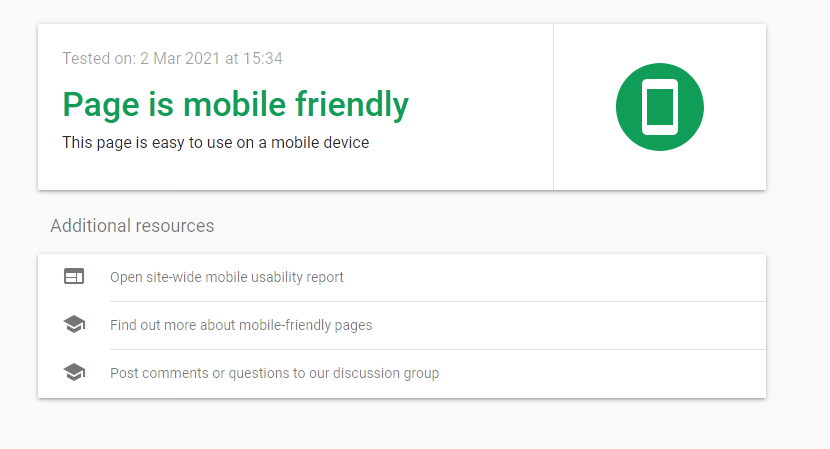
But it does complain about some inaccessible files that are not local (and are not related to the appearance):

If you get intermittent errors complaining about missing or inaccessible site files which otherwise work, you’ll need to get in touch with your hosting provider as they may need to look through the logs to identify the cause – could be due to some resource overload issue on the hosting server.
If you like our creations, help us share by rating them on WordPress.org.
Please check the available documentation and search the forums before starting a topic.March 2nd, 2021 at 16:37 #114758In reply to: Delete header image (mantra)
Cryout Creations mastermindHi,
I’m not sure where that message is displayed so I couldn’t tell you what exactly it refers to.
Could you provide more information about what dashboard section/screen it’s displayed on?If you like our creations, help us share by rating them on WordPress.org.
Please check the available documentation and search the forums before starting a topic.March 1st, 2021 at 06:27 #114721In reply to: How do I inherit the markup style?
The rendering style of the short content of the post from the full style. That is, so that the short publication is also displayed in width, and not on the left.
///
Стиль отображенния короткого содержимого публикации из стиля полного. Тое сть, чтобы короткая публикация тоже отображалась по-ширине, а не слева.
March 1st, 2021 at 00:13 #114704In reply to: Blog meta “Display Date” is checked, but not showing
Cryout Creations mastermindHi,
All your currently visible posts are marked as sticky. The theme hides dates on sticky posts because they can cause confusion, considering possibly older sticky posts will be displayed before possibly newer regular posts. This can leave the impression that content hasn’t been updated since the older (first) sticky post has been published.
If you like our creations, help us share by rating them on WordPress.org.
Please check the available documentation and search the forums before starting a topic.February 28th, 2021 at 23:47 #114694In reply to: ‘Read more’ arrow in header is covering my buttons
Cryout Creations mastermindHi,
That arrow shouldn’t overlap the caption buttons unless the banner is rather short (or the caption title and text use multiple lines).
Its visibility is not configurable through the options, but you can still hide it with CSS:
body .meta-arrow {
    display: none;
}
Apply custom CSS using WordPress’ Additional CSS panel on the customize screen.
If you like our creations, help us share by rating them on WordPress.org.
Please check the available documentation and search the forums before starting a topic.February 28th, 2021 at 23:41 #114693In reply to: Section Title Conflict With Section Description
Cryout Creations mastermindBravada’s section titles are designed to appear in their own, peculiar way. You can see how this work with the default colors on the theme’s demo.
I’m certain this design won’t work with all color combinations, though, but we’re not even aiming for that because it would simply mean having a dark text on light background everywhere (or the reverse) and no personality at all. Pretty much like today’s minimalistic design we see everywhere that lacks any identity. In my view not everything has to be a box with corners to be usable.It’s tweaks like these that CSS is for. Use the following identifier to target the section titles:
.main .lp-section-header .lp-section-title { }
Note that they inherit the general site text color and have the opacity lowered to appear that way – you’ll most likely need to adjust both attributes to customizeIn Bravada the main navigation is the one triggered by the hamburger icon and displayed overlaid on the site. The theme also supports an additional top navigation area, visible in the header between the logo/title and hamburger icon.
If you like our creations, help us share by rating them on WordPress.org.
Please check the available documentation and search the forums before starting a topic.February 28th, 2021 at 23:15 #114686In reply to: How to delete burger menu
Cryout Creations mastermindTry
body .menu-burger {
    display: none;
}
If you like our creations, help us share by rating them on WordPress.org.
Please check the available documentation and search the forums before starting a topic.February 20th, 2021 at 13:38 #114280In reply to: Different header heights for different pages
Hey!
I fixed this by setting the landing page slider to ‘banner image’ (with a large banner image) and then having the other pages’ header images as small as I could make them (header > content > header image height), while still containing the page titles. This seems to work in terms of minimising the header of other pages for mobile display, although I’m struggling with having the theme work for mobile in other respects (menu and page title from the header are all over the place!!)
Hope this helps! 🙂
-Margot
February 16th, 2021 at 19:41 #114138Cryout Creations mastermindI notice the site still uses the theme’s example header image – as can be seen on the search page (which doesn’t have a configurable header image).
If you’re comparing the blog section’s header with that of the homepage note that the homepage, as currently configured, does not display the header image – but the different banner image – in its slider section.
If you like our creations, help us share by rating them on WordPress.org.
Please check the available documentation and search the forums before starting a topic.February 16th, 2021 at 19:28 #114137In reply to: Properly Size Images for Bravada
Cryout Creations mastermindHi,
2. The optimum image sizes are those set in the theme’s configuration options (there are multiple configurable size values) or any sizes that are larger than those values but have the same aspect ratios.
If you want to see the exact image sizes that are used on the site, you can install our SysInfo plugin – any image size that includesbravadabelongs to the theme.3. If you do not use a custom menu, then the theme will display WordPress’ automatically generated pages list menu.
4. There was a hiccup in some theme version that made some images display with unwanted extra empty space around theme – this is fixed in the current theme release. If you feel the images are still too small, check the registered image sizes (#2).
If you like our creations, help us share by rating them on WordPress.org.
Please check the available documentation and search the forums before starting a topic. -
AuthorSearch Results



