
-
AuthorSearch Results
-
April 27th, 2022 at 19:29 #128977
In reply to: Editing wp query loop block via css
Zed
Cryout Creations mastermindHi,
The query block uses very different markup for its output from the regular posts list displayed by the theme, so none of the existing posts list appearance styling will apply to it.
Unfortunately, there’s no easy way (CSS class/identifiers) to change this.If you like our creations, help us share by rating them on WordPress.org.
Please check the available documentation and search the forums before starting a topic.April 4th, 2022 at 13:05 #128186In reply to: Tempera Custom Logo DOES not work for favicon
Hi Steve,
Thanks for your reply. Maybe I have a problem because I don’t use the customizer, I tried, but unfortunately it didn’t work well with the content. So if you have another tip?
Thanks in advance!
Ann
April 3rd, 2022 at 23:47 #128172In reply to: Tempera Custom Logo DOES not work for favicon
Steven Roberts
Power UserAnneke simply open the customizer under appearence and go into site identity i believe its there id double check for you but Im on my phone at the moment. you can easily set this yourself once in the customizer
good luck
holler back if you need helpCheers
StevenMarch 24th, 2022 at 00:30 #127718In reply to: Sticky Navigation Bar
I used an unfamous plugin called: Catch Sticky Menu
And this works in the Theme Nirvana for desktop and mobile view perfectly.Desktop menu selector: #access
I left the Mobile Menu Selector empty because I don’t want a sticky menu on mobile.However, when I wanted te mobile menu to get sticky, do not use #access or #nav-toggle
because this won’t work well with z-index.Instead use for Mobile Menu Selector: #header.
Then the z-index is right. The mobile header and menu is sticky.My problems with Sticky menu in the Nirvana theme:
– The hamburger menu shows, but it won’t stick
– Clicking on the hamburger menu (despite giving max/min-sizes) will not show the menu while holding the mobile phone vertically.
– When turning horizontally, the menu shows, depending on min/max size in the width that is given
– could not deactivate the plugin for mobile view. So: no menu on mobile.-
This reply was modified 4 years ago by
Nervo.
March 14th, 2022 at 15:20 #127419In reply to: Header Image Height Reduced?
Otti
Power UserI think Zed is on vacation.
Unfortunately there is no update in my account, I am now working without a child theme again, so the graphic errors have now disappeared for me.
Posting works again since I swapped WordPress’s Classic Editor for a different one.
_______________________________________________________________
Ich denke Zed hat Urlaub.
In meinem Konto ist leider kein Update, ich arbeite nun wieder ohne Child Thema, dadurch sind die Grafikfehler bei mir jetzt verschwunden.
Das Erstellen von Beiträgen geht wieder, seit ich den Classic Editor von WordPress gegen einen andern getauscht habe.March 6th, 2022 at 03:23 #127166In reply to: Header Image Height Reduced?
Power UserI have the same problem here.
Various graphic errors and I can no longer change the posts or create new ones.
There is no update available for the child theme, what’s the next step?Ich habe das gleiche Problem hier.
Diverse Grafik Fehler und ich kann die Beiträge nicht mehr ändern oder neue erstellen.
Für das Child Thema ist kein Update verfügbar, wie geht es weiter?March 3rd, 2022 at 10:39 #127047In reply to: Font not visible when searching in burger menu
Hi,
same issue here. The search bar is not displayes as wanted in safari. There is a white background, so you cannot see the search Icon or text. Transparency is not applied to the background of the search bar. I tried some CSS changes, but this did not help.
Please have a look.
Regards
February 27th, 2022 at 23:49 #126952In reply to: CUSTOM CSS is not applied unless doing this
Cryout Creations mastermindHi,
Custom CSS is included from the options directly inline, after the main styling file. You can check if your changes are present right after being done by viewing the source of the site.
WordPress’ additional CSS field content is included the same manner, but a bit later in the source.A delay in changes taking effect until a bigger change is done to the site is usually a clear indication of caching being present and not clearing properly (in some cases there may even be multiple levels of caching).
If you like our creations, help us share by rating them on WordPress.org.
Please check the available documentation and search the forums before starting a topic.February 26th, 2022 at 18:21 #126910Cryout Creations mastermindHi @MichaelWieden,
I would need to browse your site to investigate this further. Could you provide a link?
If you like our creations, help us share by rating them on WordPress.org.
Please check the available documentation and search the forums before starting a topic.February 26th, 2022 at 17:38 #126908In reply to: different header size
Cryout Creations mastermindThe static homepage is core WordPress functionality – to activate it you need a (static) page, normally with content since WordPress will use it on the site’s homepage.
The theme extends this existing functionality through its landing page feature, which allows additional special content on the homepage beside that one static page, and even allows you to disable the static page’s use entirely (in which case a blank homepage can also be used; but note that the page’s properties such as title will still normally be used for meta/SEO purposes).
If you like our creations, help us share by rating them on WordPress.org.
Please check the available documentation and search the forums before starting a topic.February 21st, 2022 at 15:57 #126715In reply to: Excerpt area not available on pages
Hi Zed,
Thanks for the answer and solution.
On a first view it seems to solve the issue.Best
TobiasFebruary 19th, 2022 at 23:20 #126680In reply to: Problem with the menu
Cryout Creations mastermindHi,
Please see my answer on Anima as the same functionality applies.
Thanks for pointing out the glitch on our Kahuna (Plus) demo, I reconfigured the limit.
If you like our creations, help us share by rating them on WordPress.org.
Please check the available documentation and search the forums before starting a topic.February 19th, 2022 at 23:11 #126676In reply to: Plugin for self hosted custom font
Cryout Creations mastermindHi,
There are multiple plugins for embedding fonts on the site in the .org repository, however none of them would integrate in any way with Nirvana’s options (to make the embedded fonts selectable in the font lists). There is currently no way to apply custom fonts beyond Google Fonts through Nirvana’s options – this needs to be done manually (with CSS) for the respective content elements.
We’ll try to add support for custom font identifiers beside the existing Google Fonts support with a theme update.
If you like our creations, help us share by rating them on WordPress.org.
Please check the available documentation and search the forums before starting a topic.February 19th, 2022 at 22:57 #126672In reply to: Regarding Google Font sentence at german court…
Cryout Creations mastermindHi,
The theme uses Google Fonts when configured to do that – by using the dedicated Google font identifier fields in the options. If you leave the identifier fields empty and select any of the fonts from the preset fonts list, those rely solely on browser/operating system support.
It is not currently possible to set custom font names through Nirvana’s options (to apply manually embedded fonts, for example) – but we’ll try to add this in a future update.
If you like our creations, help us share by rating them on WordPress.org.
Please check the available documentation and search the forums before starting a topic.February 19th, 2022 at 22:53 #126671In reply to: Different Header Image For Tags and Categories
Cryout Creations mastermindHi,
Archive sections (tags/categories) don’t have built-in support for individual featured images so they can’t make use of the theme’s featured images in header functionality.
I have not personally tested its functionality, but this plugin appears to support custom header images for categories and tags.
If you like our creations, help us share by rating them on WordPress.org.
Please check the available documentation and search the forums before starting a topic.January 21st, 2022 at 07:01 #125637In reply to: Links do not work after upgrade to 3.3.1
Hi. I’m experiencing links on a category page not working. The links in the widget work, but nothing in the post excerpt section, including the twitter and facebook buttons. Thanks. See the link below.
https://bedard.com/category/toughest-school-in-north-america
January 21st, 2022 at 01:17 #125628In reply to: Double footer menu
TigerWolf
Power UserThank you!
It is almost perfect, but not exactly.
I want 2 rows, with the second longer.
Contact | Doneren
Archief | Privacy verklaring | NieuwsbriefIs this also possible?
January 21st, 2022 at 00:34 #125619In reply to: Transparent articles
Cryout Creations mastermindHi,
That cannot be achieved through the options but should be doable with custom CSS.
However, since there are multiple elements that have a background color set and can also display posts, I’d need to see the exact places you want transparent indicated in a screenshot, if possible.If you like our creations, help us share by rating them on WordPress.org.
Please check the available documentation and search the forums before starting a topic.January 21st, 2022 at 00:31 #125618In reply to: title before text areas in landing page?
Cryout Creations mastermindHi,
Each text area has a title and content section (the title and content of the source page). If you require an extra title beside the page title itself, you’d be able to partially achieve that by using one extra text area just for the extra title (but there aren’t 8 text areas in the free Bravada) and/or perhaps by using the featured boxes section for their titles (and leaving them empty of content by assigning an empty category).
If you like our creations, help us share by rating them on WordPress.org.
Please check the available documentation and search the forums before starting a topic.January 21st, 2022 at 00:21 #125615Cryout Creations mastermindHi,
I feel it’s rather harsh to consider a theme abandoned after 5 days of no replies on a free support forum.
Anyway, to answer your question I will need more information since I can’t really pinpoint what the desired outcome of “enforce left-alignnment for the entire theme” would need to be.
– Are you referring to the general text alignment?
– Do you mean the blockquotes (since those are the ones targeted in your CSS)?
– Do you want to left-align text in blockquotes? (it already is)
– Are you looking to left-align the blockquotes as a whole?body .entry-content blockquote { margin-left: 0; }If you like our creations, help us share by rating them on WordPress.org.
Please check the available documentation and search the forums before starting a topic.January 21st, 2022 at 00:13 #125613In reply to: Bravada – Featured Boxes only show Lorum Ipsum
Cryout Creations mastermindHi,
When the featured boxes (or pages or blocks for that matter) show a different excerpt or content than what they should (and generally the same everywhere) that’s usually an indication of a plugin filtering the content on that site section. Since the plugin isn’t aware of the theme’s specific functionality, when it filters the core content/excerpt retrieval functions, it returns the content/excerpt of the main static page everywhere.
The most frequent cause of this are content builders plugins being used on the static page that’s assigned as the homepage. If that is your case as well, you’ll need to avoid using the builder to create the content for the home static page.
If you like our creations, help us share by rating them on WordPress.org.
Please check the available documentation and search the forums before starting a topic.January 18th, 2022 at 01:24 #125462In reply to: Landing Page Features Not Working
Hello, I am having similar issues. I have set the home page as a static page and then created some landing page features along side this. Now the static page itself will not show up at all. I have tried even connecting other pages as the static page and does not work. I tried deactivating all plug ins and then reactivating them but did not work. Can someone assist me as I am really stumped at how to get around this bug with the theme.
Website: www.capitalpsychotherapy.ie
January 1st, 2022 at 19:46 #124896In reply to: gallery not published
ok. Menu problem is fixed.
Does somebody know how I can change what is written in the field “search”?December 21st, 2021 at 15:20 #124656In reply to: Bouton sur image en tete
Bonjour Zed
Merci pour votre retourJ’ai trouvé la solution pour le bouton d’action sur l’image d’en tête.
Mais mon en-tête est un slider et je n’ai plus l’animation des titres.
Est-ce une option prémium ?
Pour vous envoyer des captures d’écran comment puis-je procéder ? mon site est en maintenance jusqu’en janvier.
Merci pour votre aide
MarionWebsite: www.luticiole.com
December 19th, 2021 at 03:10 #124614In reply to: Unable to make changes in header and background
Cryout Creations mastermindHi,
I am not sure what difficulties you’re encountering. The header/background color/image options are core WordPress functionality and should always work (when present in the panels).
If you are able to change these options but they don’t take effect on the site, ensure that the site has no form of caching (or that the caching is cleared).
If you like our creations, help us share by rating them on WordPress.org.
Please check the available documentation and search the forums before starting a topic.December 19th, 2021 at 03:06 #124613In reply to: How to remove Archives
Cryout Creations mastermindHi,
Archives and categories are core WordPress functionality and cannot be deleted, just hidden by ensuring they are not linked to from anywhere on the site.
https://www.cryoutcreations.eu/docs/themes-legacy/settings/post-info/#show-on-blog-pages
https://www.cryoutcreations.eu/docs/themes-legacy/settings/post-info/#show-on-single-pagesIf you like our creations, help us share by rating them on WordPress.org.
Please check the available documentation and search the forums before starting a topic.December 19th, 2021 at 02:56 #124609In reply to: Top Menu opens new tab when clicked
Cryout Creations mastermindHi,
Check the advanced menu items properties when editing the menu:
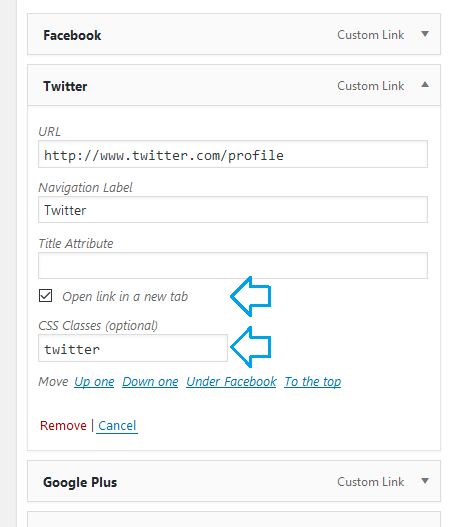
These can be enabled from the screen options:
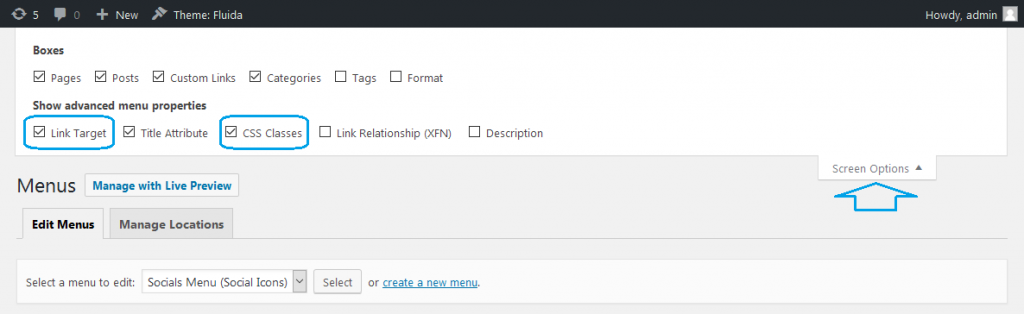 If you like our creations, help us share by rating them on WordPress.org.
Please check the available documentation and search the forums before starting a topic.December 18th, 2021 at 22:35 #124586In reply to: Podcast Player gets slimmed down on Landing Page
Cryout Creations mastermindHi,
The
iframeembedding the player has a fixed width of 310px. This is not applied by the theme’s styling.Try using the following CSS and check if the widget gives itself a different width:
#lp-text-one .lp-text-card { width: 100%; }If you like our creations, help us share by rating them on WordPress.org.
Please check the available documentation and search the forums before starting a topic.November 29th, 2021 at 12:00 #124063In reply to: Page formatting wrong on Mobile
I recently created this site. http://thecreeping.com/ Everything is looking and working great except one page when viewed on a Mobile. Here’s the page: http://thecreeping.com/full-credits/
When holding the phone horizontally it looks great but holding it vertically makes all the alignment mess up. I’m using an iPhone 8Plus and I’ve looked at it on Chrome and Safari. Any help much appreciated.
November 11th, 2021 at 19:18 #123565In reply to: Presentation Page – widgets
Hi Zed,
That’s fine, I’ve got no problem configuring the widgets…except that the presentation page displays both a full-width text box, and then 3 columns (x 2 rows) of wrap widgets. Is the full-width text a widget?
If the example text and widgets were visible in my admin I would understand better how the example presentation page is constructed. I think it’s a mistake ‘hiding’ them somewhere. Sure, they’ll disappear once I make my own content. But it’s very curious that the sample material exists at all without any entries in the presentation page or widgets. Where is this sample material, where is it hiding? Maybe I want to get rid of it off my system altogether.
Don’t get me wrong, I appreciate the sample content and seeing how a presentation page might look. But I don’t think you should hide the magic of how you did it – it might be useful to everyone!
Thanks.
-
This reply was modified 4 years ago by
-
AuthorSearch Results



