
-
AuthorSearch Results
-
June 10th, 2013 at 15:51 #7434
In reply to: How to get buttons side by side in text widget
Mariah
Jaimie,
I used the Mantra Theme (yours doesn’t say powered my Mantra, so I suppose you are not using it? If not I recommend it, Mantra is very versatile and I simply adore it & you can always contact me & I’d help with any questions that I can.) the bottom part works as my theme has Footer areas. The area was once just horizontal, until I added some more (there are 4 footer areas & I am using 3 of the 4) and they started to look vertical as I filled them in. So if you want to do this sort of thing at the bottom of your blog, the key is to go with the Mantra theme. 🙂And yes, Jaimie, if you want it in the sidebar like that and not in the footer, so far no answers here for doing this in Mantra. 🙂
June 9th, 2013 at 01:51 #7382In reply to: Menu defaulting on last menu item in mobile view
Kamn
Has this issue been resolved yet? I am also having this issue on my website.
June 7th, 2013 at 17:25 #7310In reply to: Change Tab to Current Tab
Zed
Cryout Creations mastermindThe tabs (menu items) automatically receive the “active” state when WordPress detects that you are on the page/category that menu item links to. This only works with pages/categories.
If you create the menu items as custom links, this will not happen.
If you like our creations, help us share by rating them on WordPress.org.
Please check the available documentation and search the forums before starting a topic.June 7th, 2013 at 15:34 #7302In reply to: Change main menu for members
Gasc
Thank you for this answer, it seems to be hard for such a rookie like me…
I thought it was possible by changing or adding simple PHP codes in few pages.June 5th, 2013 at 22:11 #7263In reply to: How to get buttons side by side in text widget
Actually, this was for the affiliates, I’ve seen some sites that can use the small ones side by side, I want them to look less obvious. lol I did make sure I had enough room for them side by side, when I was just starting to change them to the small size… but all I could do was left and right align and ended up with them scattered (top one on the left, the next one on the right), so I tried the code I found for that but not the desired results.
Thank you for any help you can give me. 🙂
June 5th, 2013 at 04:31 #7217In reply to: Need to edit footer in Mantra
Débora
I don’t want to change anything in the footer, just add a phrase. I tried to do it in the Custom Footer Text, but it went to two lines and I want to make it in one. How can I do it? Thank you for your answer.
June 4th, 2013 at 10:14 #7171In reply to: Need to edit footer in Mantra
Cryout Creations mastermindThe Custom Footer Text field is now located under Miscellaneous Settings.
If you like our creations, help us share by rating them on WordPress.org.
Please check the available documentation and search the forums before starting a topic.June 4th, 2013 at 10:08 #7169In reply to: Social Media Icons drop below header image
Cryout Creations mastermindI don’t see them dropping anywhere. What browser/device are you experiencing that on?
If you like our creations, help us share by rating them on WordPress.org.
Please check the available documentation and search the forums before starting a topic.June 3rd, 2013 at 17:16 #7126In reply to: Menu Color
Jason
Hi thanks for that Dee, unfortunately though this did not appear to change anything. More irritating is the fact that I did indeed download the Custom CSS from inside the “Miscellaneous Settings”, changed around the CSS inside there uploaded new one and nothing happened. This leads me to believe that there might be a bug? Am at moment looking into using the Twitter Bootstrap plug-in for a work round…
June 3rd, 2013 at 09:07 #7105In reply to: reduce white space after h1 and/or h2
Cryout Creations mastermindThis is meant to go in the Custom CSS field under Miscellaneous Settings (see my signature).
Yes, you can just place that on any H you want, but try to keep it within #content .entry-content, otherwise you will affect all headings on the site:
#content .entry-content h1, #content .entry-content h2, #content .entry-content h3 ... { }If you like our creations, help us share by rating them on WordPress.org.
Please check the available documentation and search the forums before starting a topic.May 31st, 2013 at 17:22 #7041In reply to: Video on the home page
Cryout Creations mastermindFrom a visitor’s point of view, videos on the home page are so intrusive for me… I really hate it when random videos start playing, especially those with sound. I actually use Firefox extensions just to block this behaviour in my daily browsing. But this is just me 🙂
We had to chose between a good image slider and a slider supporting videos (which by definition will lack most image transition effects because it cannot mix videos and effects). Sliders supporting both good transition effects and videos are very complex, cost money and cannot be included in a free theme. So we chose the currently included slider.
For extreme purposes, the presentation page slider can be changed (via child themes) to any other slider one wishes (and has at hand).
Videos on the presentation page columns and two bottom text areas are now possible via shortcodes/plugins.
If you like our creations, help us share by rating them on WordPress.org.
Please check the available documentation and search the forums before starting a topic.Cryout Creations mastermindYou probably need to apply that to body, and you can insert it in the Custom CSS field under Miscellaneous Settings.
Remember to first disable the WordPress defined background image/colour (if set) in Appearance > Background.
PS: that rule will only work on part of the browsers. Have a look here for a complete CSS3 linear gradient background generator.
If you like our creations, help us share by rating them on WordPress.org.
Please check the available documentation and search the forums before starting a topic.May 30th, 2013 at 23:11 #7014Cryout Creations mastermindYou can grab the entire theme from WordPress. You’ll find all the files in the archive.
If you like our creations, help us share by rating them on WordPress.org.
Please check the available documentation and search the forums before starting a topic.May 29th, 2013 at 02:22 #6972In reply to: customers cant log in or checkout
pixelcraft
sorry for the weird code in my post. here is the post without that code.
###
Hello, and thanks for all the hard work on the Mantra theme. Its really great. I am having an issue I was hoping you could help me with.
I’m using Mantra and WP E Commerce to run an online store. My problem is that customers can’t create an account or complete checkout without creating an account. Ideally I’d like them not to have to create an account in order to checkout, but to have the option to do so if they would like.
the following settings are in use:
settings > general > anyone can register is checked;
settings > store > checkout > users must register before checking out is set to “no”
The testing version of the site is located here:
http://www.shoekahuna.com/shoekahuna/
If I need to provide any further information please let me know and thanks in advance. This is my first time using either Mantra or WP E Commerce, although I have successfully developed quite a few sites using a variety of other themes and plug ins. The WP E Commerce plug in is required as my customer wished to integrate to Quickbooks via Webgility. WPEC is the only option available for that.
Again many thanks,
~ PixelCraft
May 25th, 2013 at 15:28 #6887In reply to: Cannot configure slider
Cryout Creations mastermindTry disabling JS “minification” (if the plugin offers you such control) or exclude Mantra’s js files (again, if the plugin offers such features).
I’ve encountered the same issues with W3 Total Cache and js “minification” so I believe we’ll have to play around with our theme code to make it “minify” compatible 🙂
If you like our creations, help us share by rating them on WordPress.org.
Please check the available documentation and search the forums before starting a topic.May 25th, 2013 at 15:13 #6885In reply to: Mantra Header
Kay
Cryout Creations mastermindHi!
You can add 2 things to the header:
1. A background image that would fill up the whole background area of header. You can do that by going to the Appearance -> Header.
2. A logo ( that can be any size) by going to Appearance -> Mantra Settings -> Header Settings -> Logo Upload and uploading your own image logo. Then just make sure you choose to show the logo in the ‘Site Header’ option above this.
It’s not a one or the other type of thing. You can have both the background image and the logo at the same time.
Also, if the ‘Mobile view’ settings under Layout Settings is enabled (and it is enabled by default) everything will be responsive and will show properly both on computer and mobile screens.
Good luck!
Before posting consider reading our short theme debugging instructions.
Please read the FAQs: Mantra • Nirvana • Parabola • Tempera
Tutorials: custom menus • translating theme • installing theme • category page with intro • disabling comments Wordpress: child themes • categories/posts
Before making any modifications to your theme we strongly recommend using Child Themes.May 21st, 2013 at 09:50 #6681In reply to: 2.0.3 update – Fonts gone
Cryout Creations mastermindHi and sorry about that.
While improving Google font inclusion to support font styles we kind of broke the standard fonts. We’ve already fixed this and submitted the update to WordPress, but it will take a couple of days until the update becomes live.The fixed mantra/admin/custom-styles.php file can be retrieved from the uploaded 2.0.3.1 update.
If you’re comfortable with editing files, you can fix the mantra/admin/custom-styles.php file yourself :
Search for
$mantra_googlefont = '"'.str_replace('+',' ',preg_replace('/:.*/i','',$mantra_googlefont)).'"';
$mantra_googlefonttitle = '"'.str_replace('+',' ',preg_replace('/:.*/i','',$mantra_googlefonttitle)).'"';
$mantra_googlefontside = '"'.str_replace('+',' ',preg_replace('/:.*/i','',$mantra_googlefontside)).'"';
$mantra_googlefontsubheader = '"'.str_replace('+',' ',preg_replace('/:.*/i','',$mantra_googlefontsubheader)).'"';

?><?php if (stripslashes($mantra_fontfamily) != '"Segoe UI", Arial, sans-serif' || $mantra_googlefont) { ?> * , .widget-title {font-family:<?php if (!$mantra_googlefont) echo $mantra_fontfamily; else echo $mantra_googlefont;  ?> ; }<?php }
?><?php if ($mantra_fonttitle != "Default" || $mantra_googlefonttitle) { ?> #content h1.entry-title a, #content h2.entry-title a, #content h1.entry-title , #content h2.entry-title {font-family:<?php if (!$mantra_googlefonttitle) echo $mantra_fonttitle; else echo $mantra_googlefonttitle;  ?> ; }<?php }
?><?php if ($mantra_fontside != "Default" || $mantra_googlefontside) { ?> .widget-area *  {font-family:<?php if (!$mantra_googlefontside) echo $mantra_fontside; else echo $mantra_googlefontside;  ?> ; }<?php }
?><?php if ($mantra_fontsubheader != "Default"  || $mantra_googlefontsubheader ) { ?> .entry-content h1, .entry-content h2, .entry-content h3, .entry-content h4, .entry-content h5, .entry-content h6  {font-family:<?php if (!$mantra_googlefontsubheader) echo $mantra_fontsubheader; else echo $mantra_googlefontsubheader;  ?> ; }<?php }
and replace with
$mantra_googlefont = str_replace('+',' ',preg_replace('/:.*/i','',$mantra_googlefont)); $mantra_googlefonttitle = str_replace('+',' ',preg_replace('/:.*/i','',$mantra_googlefonttitle)); $mantra_googlefontside = str_replace('+',' ',preg_replace('/:.*/i','',$mantra_googlefontside)); $mantra_googlefontsubheader = str_replace('+',' ',preg_replace('/:.*/i','',$mantra_googlefontsubheader)); ?><?php if (stripslashes($mantra_fontfamily) != '"Segoe UI", Arial, sans-serif' || $mantra_googlefont) { ?> * , .widget-title {font-family:<?php if (!$mantra_googlefont) echo $mantra_fontfamily; else echo "\"$mantra_googlefont\""; ?> ; }<?php } ?><?php if ($mantra_fonttitle != "Default" || $mantra_googlefonttitle) { ?> #content h1.entry-title a, #content h2.entry-title a, #content h1.entry-title , #content h2.entry-title {font-family:<?php if (!$mantra_googlefonttitle) echo $mantra_fonttitle; else echo "\"$mantra_googlefonttitle\""; ?> ; }<?php } ?><?php if ($mantra_fontside != "Default" || $mantra_googlefontside) { ?> .widget-area * {font-family:<?php if (!$mantra_googlefontside) echo $mantra_fontside; else echo "\"$mantra_googlefontside\""; ?> ; }<?php } ?><?php if ($mantra_fontsubheader != "Default" || $mantra_googlefontsubheader ) { ?> .entry-content h1, .entry-content h2, .entry-content h3, .entry-content h4, .entry-content h5, .entry-content h6 {font-family:<?php if (!$mantra_googlefontsubheader) echo $mantra_fontsubheader; else echo "\"$mantra_googlefontsubheader\""; ?> ; }<?php }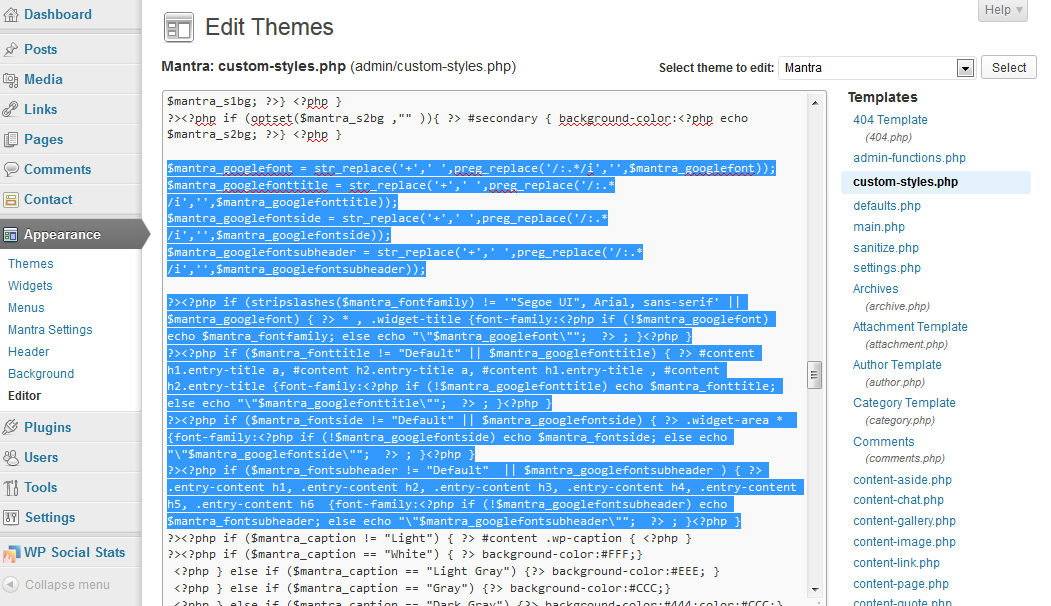 If you like our creations, help us share by rating them on WordPress.org.
Please check the available documentation and search the forums before starting a topic.May 20th, 2013 at 18:51 #6665In reply to: Mobile View not working
Cryout Creations mastermindWhat mobile device/browser are you using?
I see the pictures just fine on an Android tablet.
If you like our creations, help us share by rating them on WordPress.org.
Please check the available documentation and search the forums before starting a topic.May 20th, 2013 at 18:37 #6660In reply to: Cannot save anything!
Cryout Creations mastermindIf you’ve disabled all your plugins and still encountering this issue and you’re willing to give us temporary access to your WordPress installation, please create a support ticket (type “cannot-save” in the transaction id field) with the necessary information.
If you like our creations, help us share by rating them on WordPress.org.
Please check the available documentation and search the forums before starting a topic.May 20th, 2013 at 15:57 #6655G82
Thanks for your continued help!
Where do I add that CSS ?
I tried it in the custom CSS field (where the text centre CSS from previous post goes) but it doesn’t seem to do anything. Do I need to edit a theme file or something?
May 17th, 2013 at 19:43 #6518John Roth
OH, by the way. THANK YOU for a GREAT THEME”. This is a very versatile theme and have been recommending it for awhile to clients, friends and peers. A few tweaks like the Reply removal procedure would help greatly.
Keep up the good work.
John Roth
iBulderz
May 17th, 2013 at 12:50 #6511In reply to: Responsive Header Hiding Behide Menu
Cryout Creations mastermindYou’re using the relative dimensions.
Responsiveness is enabled by turning on “Mobile view”. Enable that option and see how it behaves then.If you like our creations, help us share by rating them on WordPress.org.
Please check the available documentation and search the forums before starting a topic.May 17th, 2013 at 12:00 #6502In reply to: Change color?
Cryout Creations mastermindAdd that rule at the end of the style.css file or in Mantra’s Custom CSS field.
If you like our creations, help us share by rating them on WordPress.org.
Please check the available documentation and search the forums before starting a topic.May 14th, 2013 at 01:27 #6267In reply to: Mantra Child Theme and modified theme-functions.php
Leon
Thank you, Zed.
I already found a solution on the WordPress forum:
Leon (lg77)
May 13th, 2013 at 21:30 #6261In reply to: Mantra Child Theme and modified theme-functions.php
Jason Martin
I’m trying to remove the WordPress link from the footer as I have heard the link can attract hackers. I have had a few problems with them. I would also be able to add my own link such as powered by Mantra & innerHouse Designs. I tried to deactivate the function and then add a modified one in the child but it broke my site. I think it was resending the header or something.
May 13th, 2013 at 10:04 #6242In reply to: Change color?
shadow
Hi there! I have the same problem, but it doesn’t work to solve it 🙁
Can anyone help? Thanks!
May 12th, 2013 at 23:08 #6229In reply to: Mantra Child Theme and modified theme-functions.php
Cryout Creations mastermindYou can’t replace files present in the includes folder by placing identically-named files in the child theme as well.
You have to override functions one-by-one in the child theme; some can be overriden by simply using the same function name in the child theme, other more fundamental functions need to be unhooked from the parent Mantra and replaced with their child version (otherwise things break).
You need to tell me which functions you are trying to replace for me to give you more detailed instructions…
If you like our creations, help us share by rating them on WordPress.org.
Please check the available documentation and search the forums before starting a topic.May 11th, 2013 at 18:32 #6153In reply to: Make the header print out
Melissa
I have been looking at the css for @media print and wonder if there is something that needs to be changed there for the header to show up on the printout. I assume that has to be done under Mantra Settings/Misc Settings/Custom CSS.
What I found is that if I choose “Site Title and Description”, that will show up in the print preview, but if I choose Custom Header, it is blank. The site is http://www.esummarize.com.
May 10th, 2013 at 22:21 #6129In reply to: Can't use mantra settings
Sarah
I’m having the same issue. I’m using Mantra version 2.0.2 according to me settings page but can’t get the setting options to open. “Customize” doesn’t give me all the options I want. I’ve tried disabling all my plug ins but still nothing. Any ideas on how I can fix it?
May 10th, 2013 at 16:58 #6115In reply to: Mobile View not working
Lynda Knezovich
No I have not changed anything in the Mantra files. I would not know how to do that. This is my first experience ever creating a website and I have only changed the things that I can change from the Settings pages.
-
AuthorSearch Results
