

Forum Replies Created
-
AuthorPosts
-
Zed
Cryout Creations mastermindHi,
That particular function is not pluggable so it cannot be customized by simply re-declaring it in the child theme. This also means it isn’t possible for such a customization to have worked before (regardless of any theme updates) unless changes were also done to Anima itself.
You will need to track down or recover all the customizations and transfer them in their entirety to the child theme.
If you like our creations, help us share by rating them on WordPress.org.
Please check the available documentation and search the forums before starting a new topic.May 23rd, 2021 at 22:52 in reply to: How to Remove hover over Add to Cart slide up button WooCommerce products #118281Cryout Creations mastermindTry adjusting the CSS to:
.post-type-archive-product ul.products li.product .woocommerce-thumbnail-container:hover a img,
.tax-product_cat ul.products li.product .woocommerce-thumbnail-container:hover a img {
    transform: none;
}
.post-type-archive-product .woocommerce-thumbnail-container:hover .woocommerce-buttons-container,
.tax-product_cat .woocommerce-thumbnail-container:hover .woocommerce-buttons-container {
    transform: translateY(100%);
}
If you like our creations, help us share by rating them on WordPress.org.
Please check the available documentation and search the forums before starting a new topic.Cryout Creations mastermindHi,
The icon blocks follow the theme’s general typography options.
To customize them separately from this you would need to use and apply custom CSS:
.lp-blocks .lp-block-text {
    font-family: ...;
    /* other formatting rules */
}
If you like our creations, help us share by rating them on WordPress.org.
Please check the available documentation and search the forums before starting a new topic.Cryout Creations mastermindBoth themes share the same header layout.
You’re using the theme’s menu in a way it was not intended to be used (overflowing its area/container and overlapping the content below), which might have unexpected visual effects in some specific screen size or content cases.If you like our creations, help us share by rating them on WordPress.org.
Please check the available documentation and search the forums before starting a new topic.Cryout Creations mastermindPerhaps it was a glitch on Apple’s part in that browser release only.
We’ll include the CSS fix anyway in the next theme update since it doesn’t affect anything adversely.If you like our creations, help us share by rating them on WordPress.org.
Please check the available documentation and search the forums before starting a new topic.Cryout Creations mastermindI was referring to the page template option:

The top one is the old method of setting the layout in Verbosa, which is still supported for compatibility with sites that haven’t been updated to use the new meta layout option.
However using both methods to set different layouts can end up malfunctioning.If you like our creations, help us share by rating them on WordPress.org.
Please check the available documentation and search the forums before starting a new topic.May 22nd, 2021 at 23:27 in reply to: How to Remove hover over Add to Cart slide up button WooCommerce products #118246Cryout Creations mastermindHi,
That effect is applied by WooCommerce’s own styling. You can try to following CSS to remove it:
.post-type-archive-product .woocommerce ul.products li.product .woocommerce-thumbnail-container:hover a img {
    transform: none;
}
.post-type-archive-product .woocommerce-thumbnail-container:hover .woocommerce-buttons-container {
    transform: translateY(100%);
}
If you like our creations, help us share by rating them on WordPress.org.
Please check the available documentation and search the forums before starting a new topic.Cryout Creations mastermindHi,
The buttons have link fields in which you can insert the necessary URLs to either navigate to a different site section or jump in-page to a specific location.
The latter are what’s called anchor links and have a specific procedure of setting up:
https://www.w3docs.com/snippets/html/how-to-create-an-anchor-link-to-jump-to-a-specific-part-of-a-page.html
To use anchor links on the landing page you’ll need to know the theme’s existing section IDs:#lp-blocks1 #lp-blocks2 #lp-boxes-1 #lp-boxes-2 #lp-boxes-3 #lp-text-zero #lp-text-one #lp-text-two #lp-text-three #lp-text-four #lp-text-five #lp-text-six #lp-portfolio #lp-testimonials #lp-page or #lp-postsor add your own IDs in the desired content locations.
If you like our creations, help us share by rating them on WordPress.org.
Please check the available documentation and search the forums before starting a new topic.Cryout Creations mastermindHi,
Could you include a link to your site or at least a screenshot with the issue?
If you like our creations, help us share by rating them on WordPress.org.
Please check the available documentation and search the forums before starting a new topic.Cryout Creations mastermindHi,
Fluida’s design include a menu bar which holds the site title/logo, main navigation and header socials, followed below it by the header image area, which also includes a widget area.
You could use this widget area to add custom content to the header.
If you like our creations, help us share by rating them on WordPress.org.
Please check the available documentation and search the forums before starting a new topic.Cryout Creations mastermindHi,
The icon blocks use a custom theme function to generate the excerpts which defaults to a length of 35 words. This value is not directly configurable, but can be overridden using the theme’s
bravada_custom_excerpt_lengthfilter.If you like our creations, help us share by rating them on WordPress.org.
Please check the available documentation and search the forums before starting a new topic.Cryout Creations mastermindHi,
Could you include a link to your site or at least a screenshot with the appearance on mobile?
If you like our creations, help us share by rating them on WordPress.org.
Please check the available documentation and search the forums before starting a new topic.Cryout Creations mastermindHi,
The loading animation is not configurable. If you want to change it, you’ll have to customize the CSS it is controlled by. You can find the existing CSS under the ‘Preloader’ section in the theme’s style.css file.
If you like our creations, help us share by rating them on WordPress.org.
Please check the available documentation and search the forums before starting a new topic.Cryout Creations mastermindHi,
Septera’s default design is to have the logo/site title and menu on the same line.
I’d need to browser your site to observe the exact changes you’ve already applied before trying out further tweaks.
If you like our creations, help us share by rating them on WordPress.org.
Please check the available documentation and search the forums before starting a new topic.Cryout Creations mastermindPlease try applying this custom CSS on the site:
.animated-title .caption-title-word span.cry-double {
    top: 0;
}
If you like our creations, help us share by rating them on WordPress.org.
Please check the available documentation and search the forums before starting a new topic.Cryout Creations mastermindHi,
The featured box images are resized using JavaScript to ensure the aspect ratio is correct (since their width is relative to the browser window / screen size).
You did not include a site link so I cannot check for this, but if you have a JS error on the site that’s breaking this functionality, you can end up with distorted images.If you like our creations, help us share by rating them on WordPress.org.
Please check the available documentation and search the forums before starting a new topic.Cryout Creations mastermindHi,
The breadcrumbs (the indicator of the section you’re currently on) is designed to be displayed on top of the header image and uses the color configured as the menu background color (together with several other elements).
If you want to customize this element separately from the options, you can do so with CSS:
#breadcrumbs-container span,
#breadcrumbs-container a,
#breadcrumbs-container i {
    color: ...;
}
If you like our creations, help us share by rating them on WordPress.org.
Please check the available documentation and search the forums before starting a new topic.Cryout Creations mastermindHi,
The appearance of the featured (and header image) overlay effect is configurable configurable through the theme’s color options.
If you like our creations, help us share by rating them on WordPress.org.
Please check the available documentation and search the forums before starting a new topic.Cryout Creations mastermindReinstalling the theme would revert any changes done to its files, but you should be absolutely certain you want to do this.
If you like our creations, help us share by rating them on WordPress.org.
Please check the available documentation and search the forums before starting a new topic.Cryout Creations mastermindYou can upload a screenshot to any image upload site and then include a link to it here.
If you like our creations, help us share by rating them on WordPress.org.
Please check the available documentation and search the forums before starting a new topic.Cryout Creations mastermindHi,
I am not aware of such an icon to exist in the theme. Would it be possible for you to include/link to a screenshot?
If you like our creations, help us share by rating them on WordPress.org.
Please check the available documentation and search the forums before starting a new topic.Cryout Creations mastermindHi,
I believe you are encountering the same issue previously reported here:
https://www.cryoutcreations.eu/forums/t/cant-see-hero-image
and here:
https://www.cryoutcreations.eu/forums/t/no-header-transparencyThis is caused by PHP using a localization configuration that renders floating point numbers using comma as delimiter instead of dot (which are used directly in the CSS and not supported by browsers – the all expect decimal points). My suggestion is to change PHP regional settings to use the decimal point for floating point numbers.
If you like our creations, help us share by rating them on WordPress.org.
Please check the available documentation and search the forums before starting a new topic.Cryout Creations mastermindHi,
I have answered about this in the existing topic:
https://www.cryoutcreations.eu/forums/t/white-space-between-content-and-menu-bar-header#post-117711If you like our creations, help us share by rating them on WordPress.org.
Please check the available documentation and search the forums before starting a new topic.Cryout Creations mastermindThe theme’s styling has been manually edited, leaving what I believe is an error which forces the menu container to a large, fixed, height:
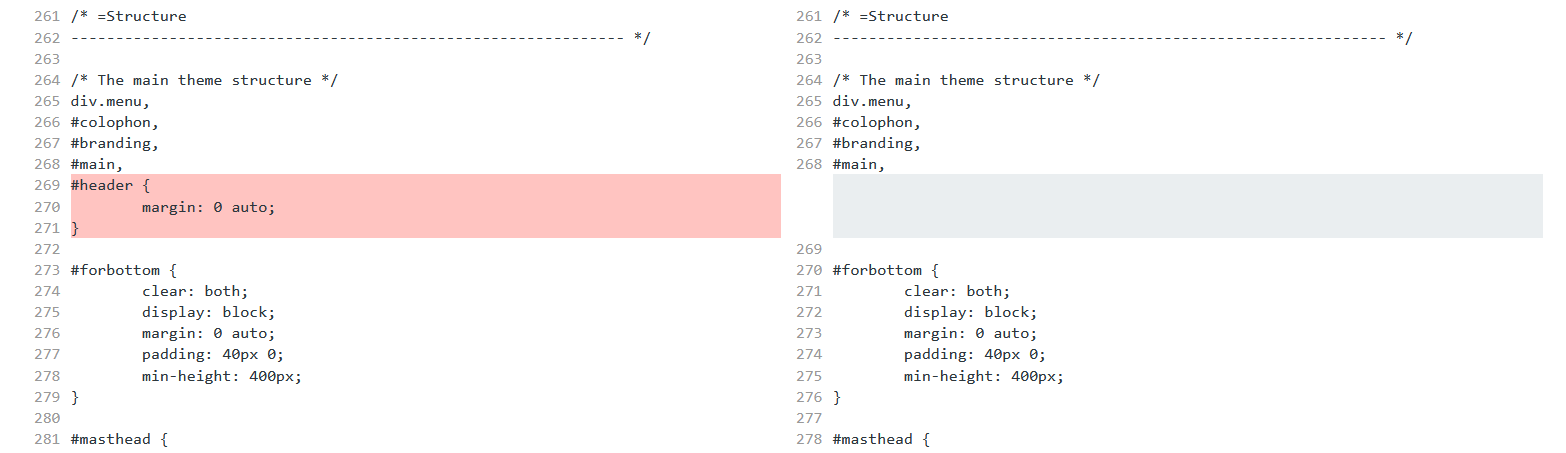
The left side is the theme’s original styling.It is generally bad practice to edit theme (or plugin) files directly. Most changes, especially CSS tweaks, can be achieved using the existing Additional CSS settings field or perhaps a child theme.
You can see the full differences list here:
https://www.diffchecker.com/VLIAWUY6If you like our creations, help us share by rating them on WordPress.org.
Please check the available documentation and search the forums before starting a new topic.May 8th, 2021 at 11:01 in reply to: Put Featured Icon Blocks BELOW the Text Areas on the landing page? #117705Cryout Creations mastermindHi,
Re-ordering the theme’s landing page elements is a feature included in the theme’s Plus edition.
With the free edition reordering can only be done manually by customizing the
content/landing-page.phpfile (preferably using a child theme).If you like our creations, help us share by rating them on WordPress.org.
Please check the available documentation and search the forums before starting a new topic.Cryout Creations mastermindAs you’re mixing light and dark background for the landing page sections, there’s no general CSS solution. You can try:
.home .lp-text, .home .lp-section-title {
    color: #fff;
}
but for best results you’ll probably need to tweak the text colors for each section individually:
#lp-blocks1, #lp-blocks2
#lp-boxes-1, #lp-boxes-2, #lp-boxes-3
#lp-text-zero, #lp-text-one, #lp-text-two, #lp-text-three, #lp-text-four, #lp-text-five, #lp-text-six
#lp-portfolio
#lp-testimonials
#lp-page or #lp-posts
If you like our creations, help us share by rating them on WordPress.org.
Please check the available documentation and search the forums before starting a new topic.Cryout Creations mastermindHi,
The URLs are controlled by Jetpack through its custom post type registration process. Based on the code
			'rewrite' => array(
				'slug'       => 'portfolio',
				'with_front' => false,
				'feeds'      => true,
				'pages'      => true,
			),
the slug is not filterable, so you’d have to swap (unhook and replace) a lot of registration code to change the URL.
If you like our creations, help us share by rating them on WordPress.org.
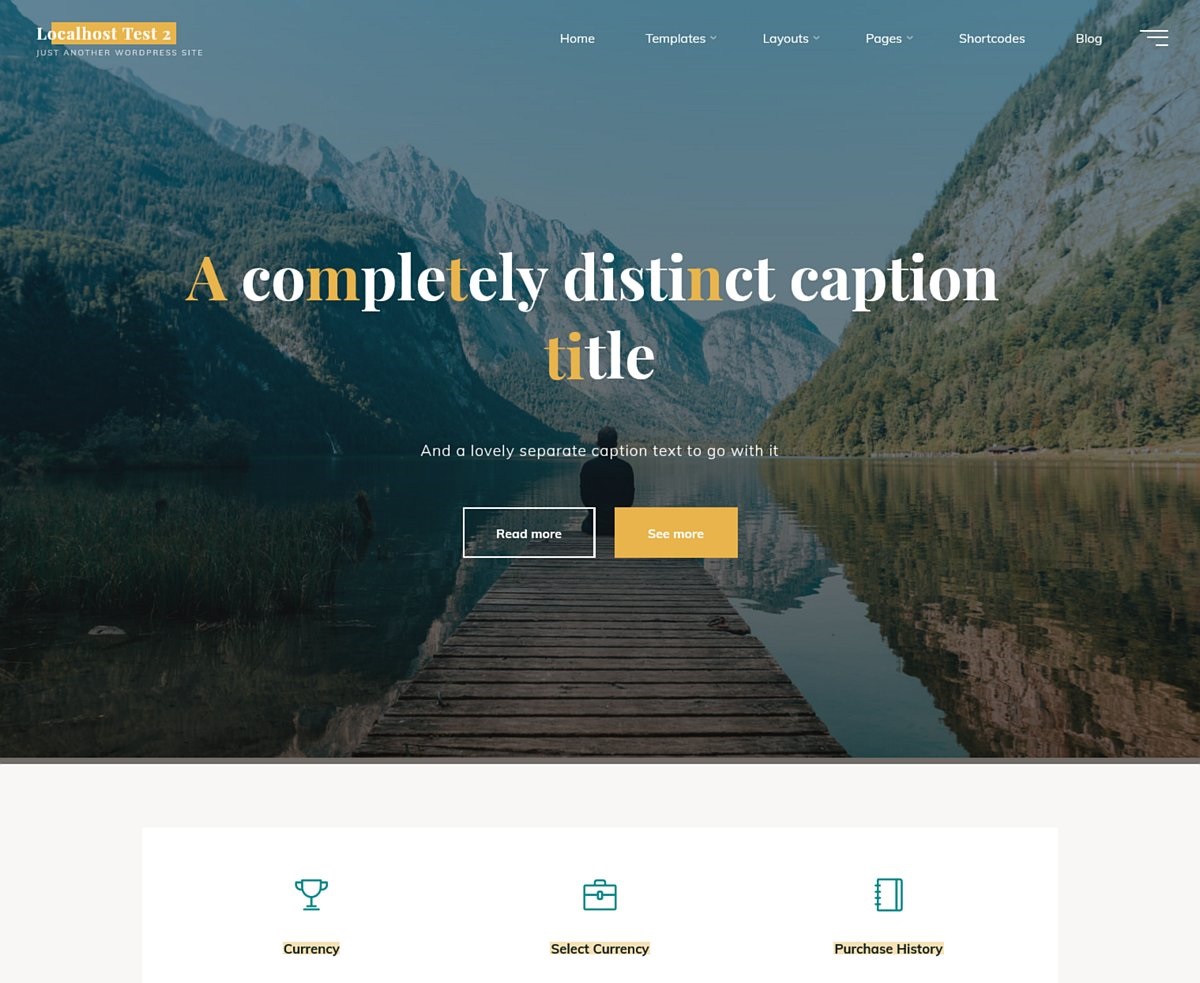
Please check the available documentation and search the forums before starting a new topic.Cryout Creations mastermindI believe we may be discussing about different configuration modes.
The configurable caption title/text is applicable to the theme’s landing page feature as the homepage:
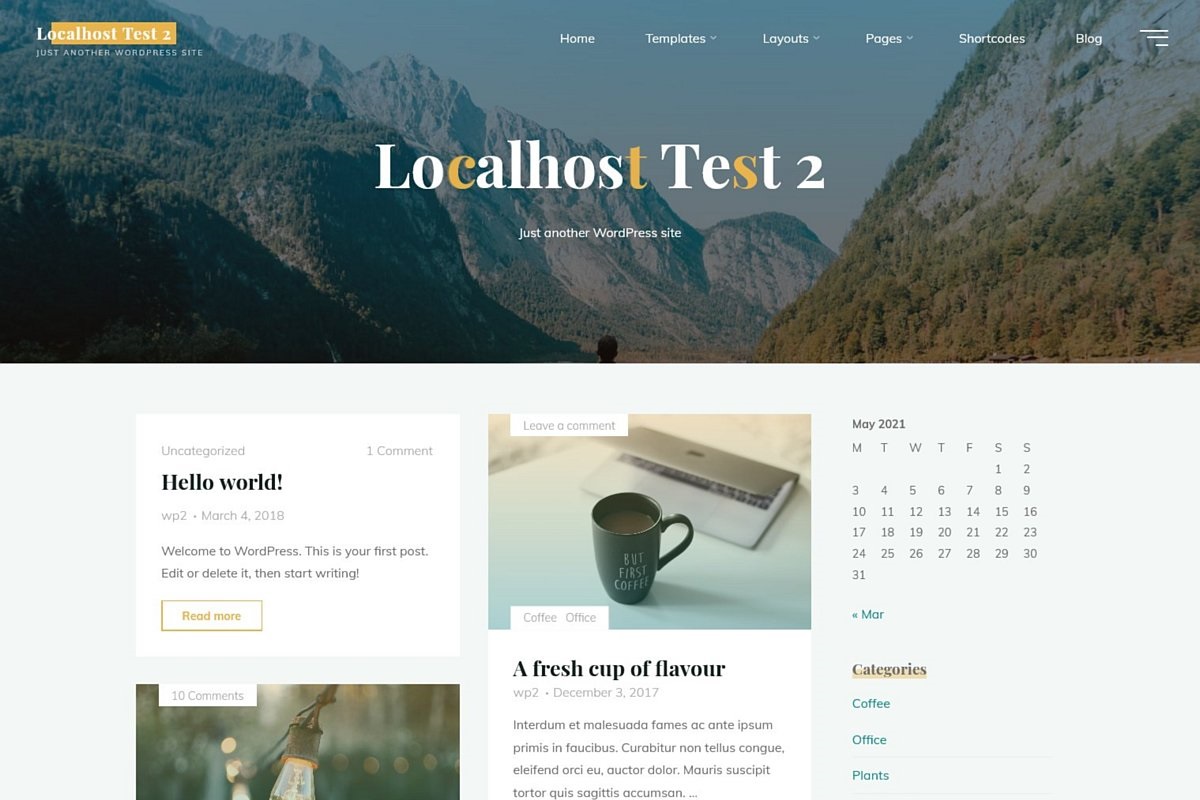
While the landing page is not activated, the theme will use the site title and tagline as the header title area for the homepage, for example with a (static) page:
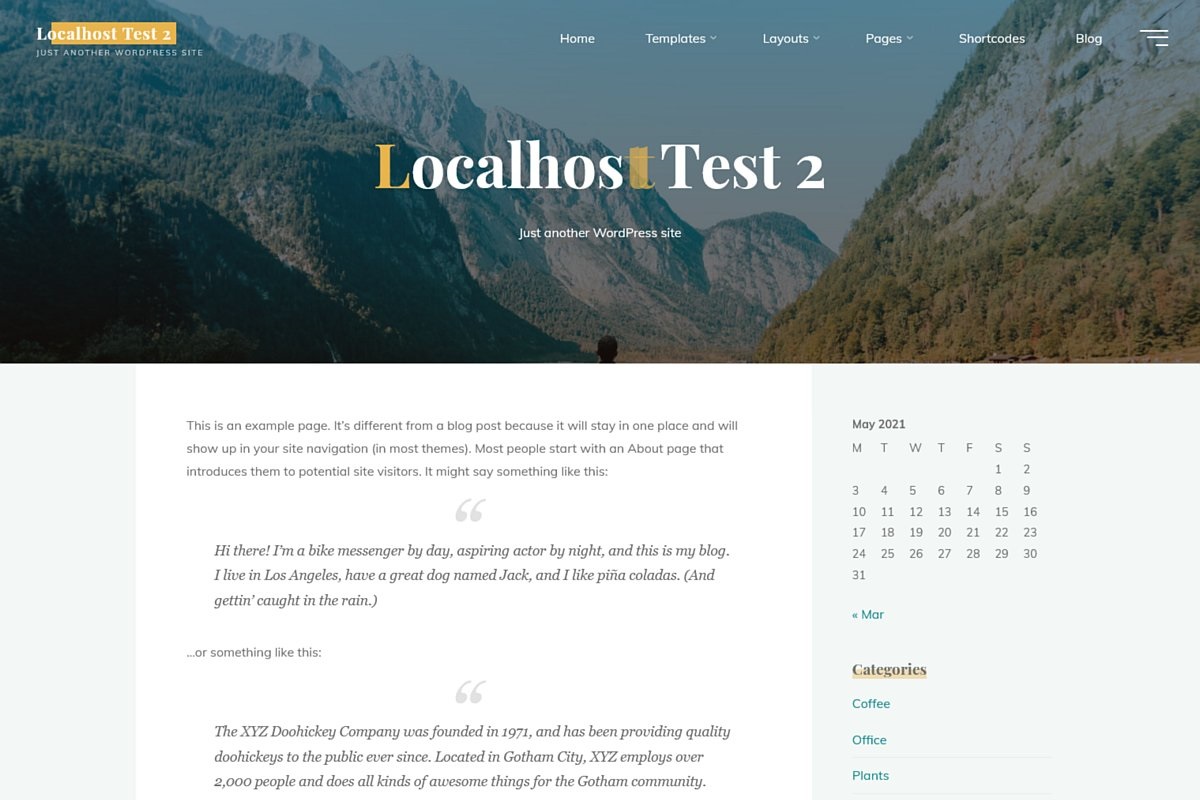
or the default posts list:
 If you like our creations, help us share by rating them on WordPress.org.
Please check the available documentation and search the forums before starting a new topic.Cryout Creations mastermindZero disables that configurable space.
If you still have some spacing between the menu and the content below with that option set to zero, then that is probably coming from the content itself.
Without browsing the site in question I can only make guesses.If you like our creations, help us share by rating them on WordPress.org.
Please check the available documentation and search the forums before starting a new topic.Cryout Creations mastermindThe following CSS will make the menu bar background green on scroll:
body.esotera-over-menu .site-header-bottom.header-fixed .site-header-bottom-fixed {
    background-color: #018e66;
}
Widgets normally inherit their colors from the general text. To customize them separately use:
.widget-container {
    color: #123;
}
To further control widget titles separately, also add:
.widget-title {
    color: #456;
}
If you like our creations, help us share by rating them on WordPress.org.
Please check the available documentation and search the forums before starting a new topic. -
AuthorPosts