
-
AuthorSearch Results
-
December 11th, 2022 at 03:32 #134886
Zed
Cryout Creations mastermindHi,
The previous/next posts navigation has always linked to the chronologically (based on publish date) ordered posts relative to the currently viewed one. This never took other attributes (category/tags) into consideration.
In Bravada 1.0.7.1 we’ve adjusted this functionality slightly to limit the previous/next post links from the same (main) category (if it exists) as the post being viewed.
If you like our creations, help us share by rating them on WordPress.org.
Please check the available documentation and search the forums before starting a topic.December 11th, 2022 at 03:20 #134885In reply to: Turn off Page Titles (Bravada)
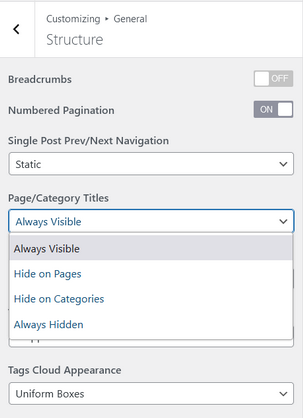
Cryout Creations mastermindThe option I pointed out in the documentation exists in all our themes and both the free and Plus editions:
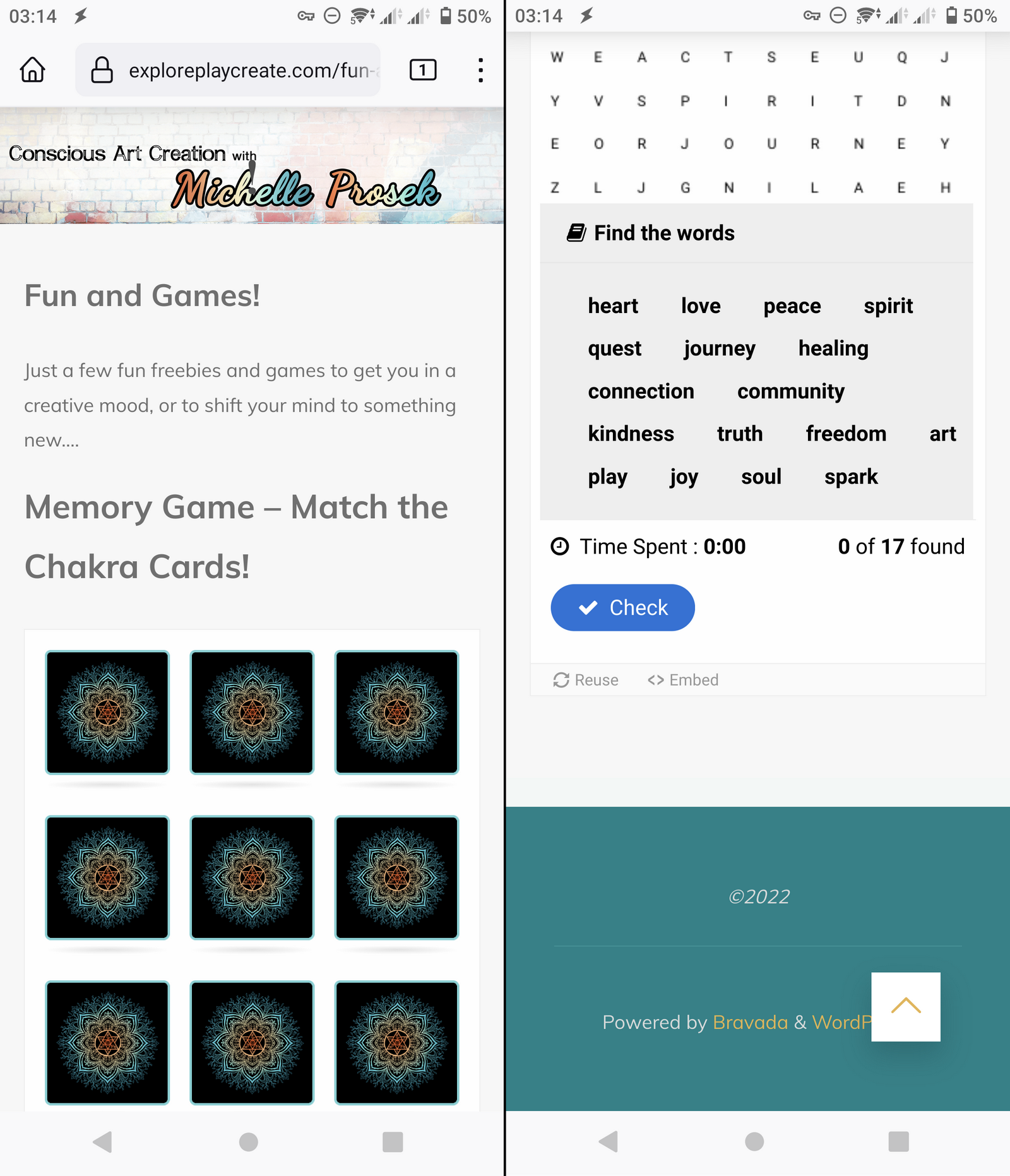
Below are screenshots with how I’m seeing the site on my Android phone and I’m not sure which text fits under the massive label:
Concerning the menus, Bravada includes two navigation areas in the header of the site:
- the main/side navigation, which is toggled into view using the hamburger icon and is displayed over the entire site. This menu is also used on mobile devices.
- the extra header navigation that is displayed inline with the site title/logo and hamburger icon. This menu is completely hidden on the smaller mobile devices and shouldn’t be used as the site’s only menu.
If you like our creations, help us share by rating them on WordPress.org.
Please check the available documentation and search the forums before starting a topic.December 10th, 2022 at 19:35 #134866In reply to: Turn off Page Titles (Bravada)
Okay…so by ‘dedicated theme option’, is that the upgraded Plus version of Bravada? Otherwise I’ve looked at the link in your reply and can’t find that anywhere on my current back end for editing the theme, unless I should go an edit the code.
Just want to verify before I pay to upgrade, although I only just started working with a new theme yesterday as I needed to make my site functional on mobile and had sort of lost hope on a reply here.The Bravada version can still be seen at exploreplaycreate.com
The only other major issue is that the header and menu don’t show up in mobile unless you turn your phone horizontal, which most people won’t even think to do, plus all the text is absolutely massive (shouldn’t there be some responsive programming to make it suitable for mobile vs. desktop?). I’ve fiddled with text sizes in the actual pages and no change..it just looks ridiculous.
I’m using an android phone, but have had a friend with an iphone verify the same issues.If you are able to look at the site on mobile you will see what I mean….I need the site to look good on a phone, and right now, it’s not so much….
Website: exploreplaycreate.com/fun-and-games
December 10th, 2022 at 15:22 #134864In reply to: Changes in the 1.8 update
jcoillard
Power UserThanks for your answer. The full message is :
Warning : undefined array key “tempera_totalSize” in julien/blog-julien/wp-content/themes/tempera/includes/theme-function.php on line 45
For the moment i use Tempera with a modification in wp-config.php tu suppresse the warning message :
/* 22.11.05 Pb warning posts
https://www.greengeeks.com/tutorials/disable-wordpress-php-error-messages/
*/
ini_set(‘display_errors’,’Off’);
ini_set(‘error_reporting’, E_ALL );
define(‘WP_DEBUG’, false);
define(‘WP_DEBUG_DISPLAY’, false);Do you that saving Tempera parameters,removing Tempera, download Tempera from your site, restore parameters could be a way to solve the problem ?
Best regards
December 10th, 2022 at 08:35 #134854In reply to: Add Mastodon social icon?
you can add a new icon yourself
at fontello.com
download the font called socials
then add new iconsthen you need to create a child theme
style.css will be created in it
download these fonts in a separate folder in my case fontsopen it and add a description of the inoknok e.g. whatsapp and telegram
—————-
/* Social Icons */
@font-face {
font-family: ‘socials’;
src: url(‘/fonts/socials.eot’);
src: url(‘/fonts/socials.eot?#iefix’) format(’embedded-opentype’),
url(‘/fonts/socials.woff’) format(‘woff’),
url(‘/fonts/socials.ttf’) format(‘truetype’),
url(‘/fonts/socials.svg?#socials’) format(‘svg’);
font-weight: normal;
font-style: normal;
}.socials a::before,
.socials a::after,
[class^=”socicon-“]::before,
[class*=” socicon-“]::before {
font-family: “socials”;
font-style: normal;
font-weight: normal;
speak: never;
content: ‘\e83d’;
display: inline-block;
text-decoration: inherit;
text-align: center;
font-variant: normal;
text-transform: none;
-webkit-font-smoothing: antialiased;
-moz-osx-font-smoothing: grayscale;
}.socials a.whatsapp::before { content: ‘\f232’; }
.socials a.telegram::before { content: ‘\f2c6’; }.socials a.whatsapp::after { content: ‘\f232’; }
.socials a.telegram::after { content: ‘\f2c6’; }.socials-whatsapp::before { content: ‘\f232’; }
.socials-telegram::before { content: ‘\f2c6’; }
—————-Website: urouter.ru
December 10th, 2022 at 03:05 #134848In reply to: Need official invoice
Cryout Creations mastermindHi,
Our system automatically generates the appropriate invoice once a payment is confirmed – for bank transfer orders we have to process them manually. The message you received is only an order confirmation.
We don’t send out proforma invoices beforehand, not even for bank transfer orders.
I have tried to send you this information and a proforma invoice, but my reply didn’t reach your address:connect to mail.hessenhub.de[137.248.186.53]:25: Connection timed outIf you like our creations, help us share by rating them on WordPress.org.
Please check the available documentation and search the forums before starting a topic.December 10th, 2022 at 02:37 #134839In reply to: Turn off Page Titles (Bravada)
Cryout Creations mastermindHi,
Header titles visibility is controlled through the dedicated theme option.
Responsiveness depends as much on the content itself as it does on the general layout rules applied by the themes. Could you point out some specific problems you’re seeing on your site with mobile devices?
If you like our creations, help us share by rating them on WordPress.org.
Please check the available documentation and search the forums before starting a topic.December 10th, 2022 at 02:34 #134838In reply to: refund please
Cryout Creations mastermindHi,
I believe we have discussed and worked out a solution for this through the support service.
If you like our creations, help us share by rating them on WordPress.org.
Please check the available documentation and search the forums before starting a topic.December 10th, 2022 at 01:20 #134815In reply to: Responsiveness for Mobile Not working?
Cryout Creations mastermindHi,
I believe we’ve resolved this through the support service.
For anyone else experiencing similar effects, the CSS can be broken by using a caching/minifying plugin. Such a plugin should be configured to not reorder the theme’s styles if merged as these need to be applied in the correct order.
If you like our creations, help us share by rating them on WordPress.org.
Please check the available documentation and search the forums before starting a topic.December 10th, 2022 at 01:13 #134813In reply to: Add Third CTA Button
Cryout Creations mastermindHi,
Because the CTA buttons are also present in the free edition of the theme, which has to follow the themes repository guidelines and only employ a limited number of configurable fields, the buttons are handled in a non-extendable manner. To add an extra button all the code responsible for the banner caption/buttons configuration and display would need to be replaced.
If you like our creations, help us share by rating them on WordPress.org.
Please check the available documentation and search the forums before starting a topic.November 28th, 2022 at 00:52 #134444In reply to: Cannot add buttons to slide
theukwedevent
Power UserAny update yet to this problem? I’m experiencing the same issue.
November 25th, 2022 at 10:22 #134391In reply to: special characters diacritics
foarte neplacut sa nu rezolvati aceasta problema. Dar nu am tema premium, dar asta nu inseamna sa nu raspundeti! Caut alta tema mai friendly si care raspunde la problemele de pe forum.
Apropo, nici pagina de contact nu functioneaza! SUPER!November 16th, 2022 at 02:22 #134066In reply to: Cannot add buttons to slide
Hi. Same here. Changes to button URL field won’t commit. They revert to blank or to previous value if copying the slide from a previous one.
Anyone else on here have any success with workarounds?
Thanks!
Website: www.2enews.com
November 8th, 2022 at 13:58 #133870In reply to: Cannot add buttons to slide
Hello!
I have a similar problem, also using Serious Slider with WP 6.1, template Fluida.
After WP latest update I am not able to change the slide buttons. For example, I need to delete a button: I delete text from the fields, click “Update”, but nothings works. The old button is still there.
Might it be connceted to WP 6.1 and Serious Slider compatibility?
Thank you in advance!November 8th, 2022 at 02:34 #133859In reply to: How is everything going?
bassicsax
Power UserHas anyone heard anything from anyone on the Cryout Creation team at all? I too am worried.
Edit: I did notice Zed provided an update for the Kahuna them on Oct 31. That’s a good sign. Fingers crossed they are all OK.
-
This reply was modified 3 years ago by
bassicsax.
November 5th, 2022 at 19:30 #133833In reply to: Changes in the 1.8 update
Power UserHello Zed,
since 2 days problems posts display with Tempera :
Warning : undefined array key “tempera_totalSize” in julien/blog-julien/wp-content/themes/tempera/includesThis problem when viewing posts
No problem with Parabola
I change (for the moment) my site to PARABOLA (without the full possibility i had on Tempera
Best regardsWebsite: julien.coillard.fr
September 30th, 2022 at 09:03 #132912In reply to: Make “Read More” and “See More” boxes as hyperlinks
Kevin
Power UserHi,
you can do this in the customizer.
Landing Page -> SliderWhen Banner Image is selected, you see CTA Button #1 and #2. First field is the displayed text, second field is the link for the boxes.
Regards
August 25th, 2022 at 10:38 #132140Addendum: I have managed with this information in the wp-config
define( ‘WP_DEBUG’, true );
define( ‘WP_DEBUG_LOG’, true );
define( ‘WP_DEBUG_DISPLAY’, false );
to get the message away from the presentation page. Which certainly doesn’t remove the warning/error though.
Please explain to me what happened there and how it will be corrected. Inquiries in other WP forums indicated that something was not “cleanly” programmed in the theme programming. I can not judge this and just want to give it as a hint.
Thanks for their help if they read this.
Website: www.beate-eierle.de
August 9th, 2022 at 21:31 #131844Warning: Trying to access array offset on value of type bool in /homepages/../……/htdocs/beate-eierle/wp-content/themes/nirvana/includes/theme-frontpage.php on line 160
If you visit my website you will still see the message. I don’t get the message from the home page, only when I disable the presentation page.
Website: www.beate-eierle.de
August 9th, 2022 at 15:44 #131830In reply to: How to make the logo appear bigger
Cryout Creations mastermindCustom styling can be used either in a child theme’s style.css file (if a custom child theme is used), WordPress’ dedicated Additional CSS field or a custom CSS plugin.
If you like our creations, help us share by rating them on WordPress.org.
Please check the available documentation and search the forums before starting a topic.August 9th, 2022 at 15:38 #131828In reply to: Sticky Menu Background
Cryout Creations mastermindI’m not sure where how you’ve reached those identifiers, since most of those classnames are not used in the theme.
Try this:
body.septera-over-menu #site-header-main.header-fixed {
  background: transparent;
}
If you like our creations, help us share by rating them on WordPress.org.
Please check the available documentation and search the forums before starting a topic.August 2nd, 2022 at 10:38 #131634Je ne sais pas où se trouve l’option du thème image mise en avant.
Mon problème s’était résolu et j’avais compris comment mettre les images en avant mais j’ai un autre soucis qui s’est déclenché.
J’avais changé mon menu pour mettre une page “activités” et dedans 2 sous éléments (pages pole dance et page méditation). Et depuis, même quand j’enlève le sous menu, les images mise en avant ne fonctionnent plus en en-tête personnalisée.
Dans “page”, lorsque je vais sur la page qui m’intéresse j’ai la boite d’image mise en avant, j’arrive à télécharger mon image et lorsque je mets à jour, l’image que j’ai sélectionné n’apparait pas (c’est l’image de la page d’accueil qui apparait). Cela concerne toutes les pages.
Je ne comprend pas d’où ça vient.Manipulations faites pour essayer de régler le problème sans y arriver: vider le cache du site, désactiver et réactiver les plugins, supprimer les image et les remettre.
Avez-vous une idée et pouvez-vous m’aider svp ?
Website: apothea.fr
August 1st, 2022 at 23:09 #131617In reply to: Sticky Menu Background
Cryout Creations mastermindHi,
You can usually use the browser developer tools to inspect the site markup and view applied styling (and also try out and test customizations).
To make the sticky menu semi-transparent you’ll need to tweak the background colors on multiple elements that make up that bar.
If you like our creations, help us share by rating them on WordPress.org.
Please check the available documentation and search the forums before starting a topic.August 1st, 2022 at 23:04 #131614In reply to: Search box
Cryout Creations mastermindHi,
Hello Word is WordPress’ sample post which can be replaced with your own or deleted if you don’t intend to use posts.
I’m not sure what you mean by search box, the theme’s search fields are controllable through the available options (and only the header one is enabled by default).
If you’re referring to a search form displayed in the content itself, that’s placed there by WordPress because your site has no other content on the section where it is located. Add some content or reconfigure the section to display something else (like a static page) and the search form will go away.If you like our creations, help us share by rating them on WordPress.org.
Please check the available documentation and search the forums before starting a topic.August 1st, 2022 at 23:00 #131613In reply to: Logo Resize
Cryout Creations mastermindHi,
The logo is limited to the available menu bar height by default, but can be made to overflow its limits using custom styling, for example:
body img.custom-logo {
  max-height: 200px;
}
Adjust the value as needed for your site.
The means for adding the logo to the footer differs depending on where exactly you want it placed (in the footer widgets, in the footer text fields, in a custom location).
If you like our creations, help us share by rating them on WordPress.org.
Please check the available documentation and search the forums before starting a topic.August 1st, 2022 at 22:42 #131611In reply to: Customizer not working after update to WordPress 6
Cryout Creations mastermindWordPress 6.0.1 undid/corrected the change that cause the customize screen issue on sites with empty post categories.
If you’re running 6.0.1 your site should no longer manifest this issue regardless of the theme and theme version used.If you like our creations, help us share by rating them on WordPress.org.
Please check the available documentation and search the forums before starting a topic.August 1st, 2022 at 19:56 #131600In reply to: Remove pin obove image in widget
Cryout Creations mastermindHi,
The pin control option currently only applies to in-content images – we’ll address that in the next theme update.
Until then, use the following CSS to remove the pin in the sidebar:
body .wp-caption { background-image: none; }If you like our creations, help us share by rating them on WordPress.org.
Please check the available documentation and search the forums before starting a topic.August 1st, 2022 at 19:49 #131599In reply to: General Font selection Bravada
Cryout Creations mastermindThe header navigation does not have independent typography controls in Bravada. You can customize it nonetheless using custom CSS styling, for example:
nav#access {
  font-family: Impact;
}
Replace with your own font identifier – make sure it is already available on the site or in (most of) the browsers/operating systems, or is embedded separately.
If you like our creations, help us share by rating them on WordPress.org.
Please check the available documentation and search the forums before starting a topic.August 1st, 2022 at 19:43 #131597In reply to: slider animation not working properly
Cryout Creations mastermindHi,
What mobile device/browser are you experiencing this on?
If you like our creations, help us share by rating them on WordPress.org.
Please check the available documentation and search the forums before starting a topic.July 14th, 2022 at 17:38 #131220In reply to: Customizer not working after update to WordPress 6
Customizer is still not working for me. Some of the customizer menus like Menus, Miscellaneous the text overlaps the original menu and is unreadable. The other customizer options slide in but the original customizer choices do not slide away or hide.
I’m using the Bravada theme and I had a Child theme for Bravada also not working but was working before the latest update. I have tried turning off plugins but that doesn’t correct the issue. I’m running WP 6.0.1 but the pho is older 7.3- could the pho version be the problem?
-
AuthorSearch Results



