
-
AuthorSearch Results
-
May 10th, 2021 at 17:05 #117772
In reply to: Overlay does not work
Zed
Cryout Creations mastermindHi,
I believe you are encountering the same issue previously reported here:
https://www.cryoutcreations.eu/forums/t/cant-see-hero-image
and here:
https://www.cryoutcreations.eu/forums/t/no-header-transparencyThis is caused by PHP using a localization configuration that renders floating point numbers using comma as delimiter instead of dot (which are used directly in the CSS and not supported by browsers – the all expect decimal points). My suggestion is to change PHP regional settings to use the decimal point for floating point numbers.
If you like our creations, help us share by rating them on WordPress.org.
Please check the available documentation and search the forums before starting a topic.May 10th, 2021 at 16:58 #117768In reply to: White space between content and menu bar/header
Cryout Creations mastermindThe theme’s styling has been manually edited, leaving what I believe is an error which forces the menu container to a large, fixed, height:
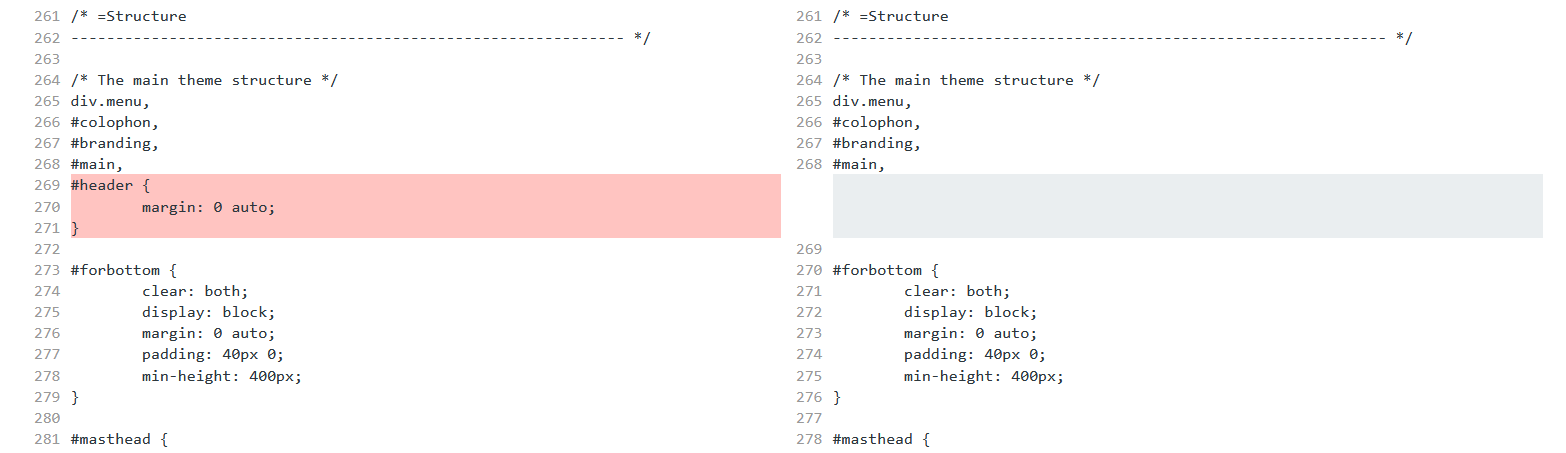
The left side is the theme’s original styling.It is generally bad practice to edit theme (or plugin) files directly. Most changes, especially CSS tweaks, can be achieved using the existing Additional CSS settings field or perhaps a child theme.
You can see the full differences list here:
https://www.diffchecker.com/VLIAWUY6If you like our creations, help us share by rating them on WordPress.org.
Please check the available documentation and search the forums before starting a topic.May 6th, 2021 at 15:38 #117655In reply to: Scroll down arrow
OK, I found. Simply in additional CSS.
Thank you.
Regards,
Etienne
May 6th, 2021 at 14:02 #117652In reply to: Scroll down arrow
Hi Zed,
Hi Mervyn,I’m very interested by the above suggestions. Like Mervyn, I would like indicate to visitors that page is scrollable.
Could you please indicate to me where/HowTo implement these changes ?
Kind regards,
Etienne
Website: www.lesindecis.be
-
This reply was modified 5 years ago by
GoodThing.
May 5th, 2021 at 21:56 #117642Rocky Trifari
Power UserThis reply is private.May 5th, 2021 at 14:59 #117613In reply to: Setting site identity separately from header text
Cryout Creations mastermindI believe we may be discussing about different configuration modes.
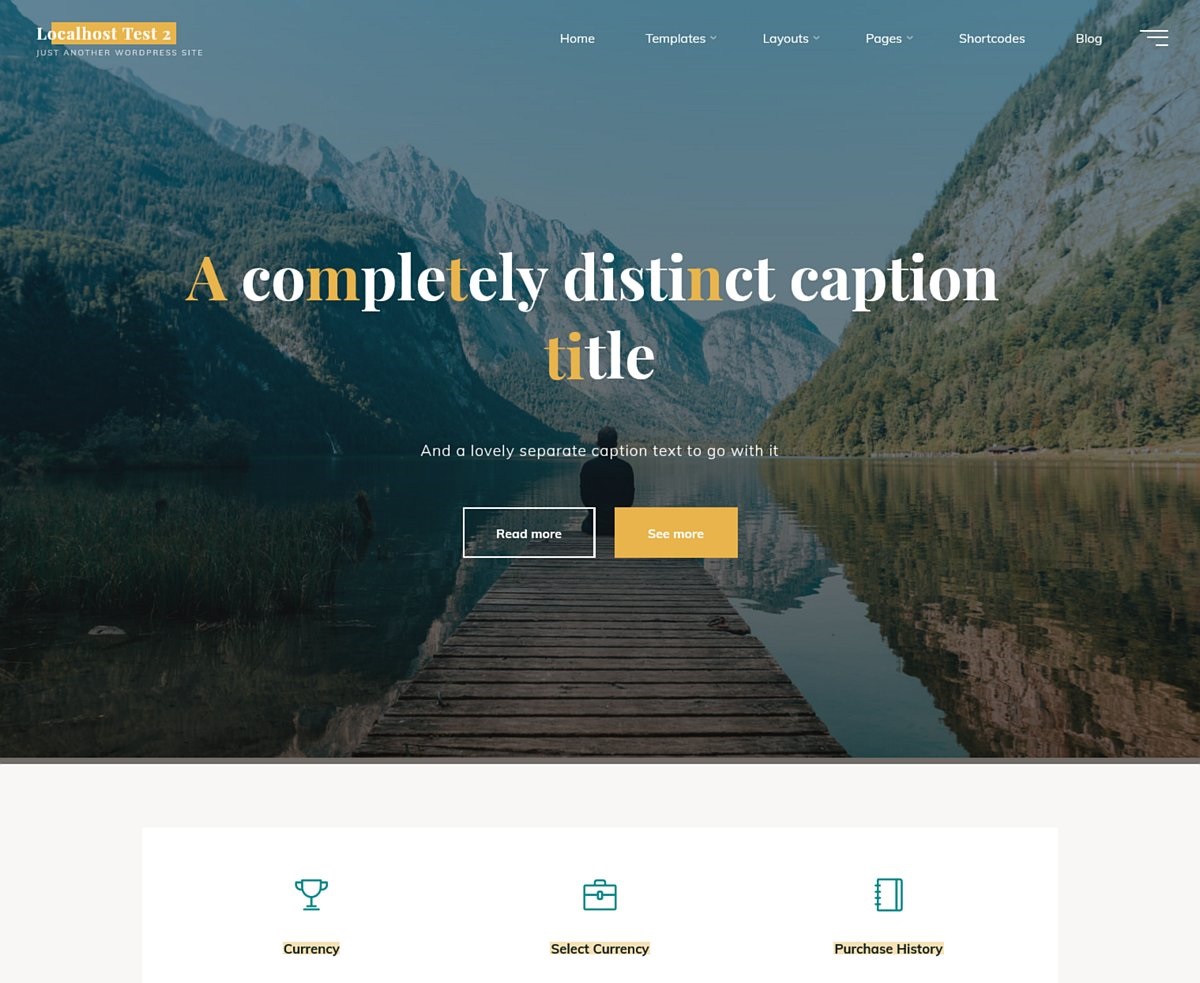
The configurable caption title/text is applicable to the theme’s landing page feature as the homepage:
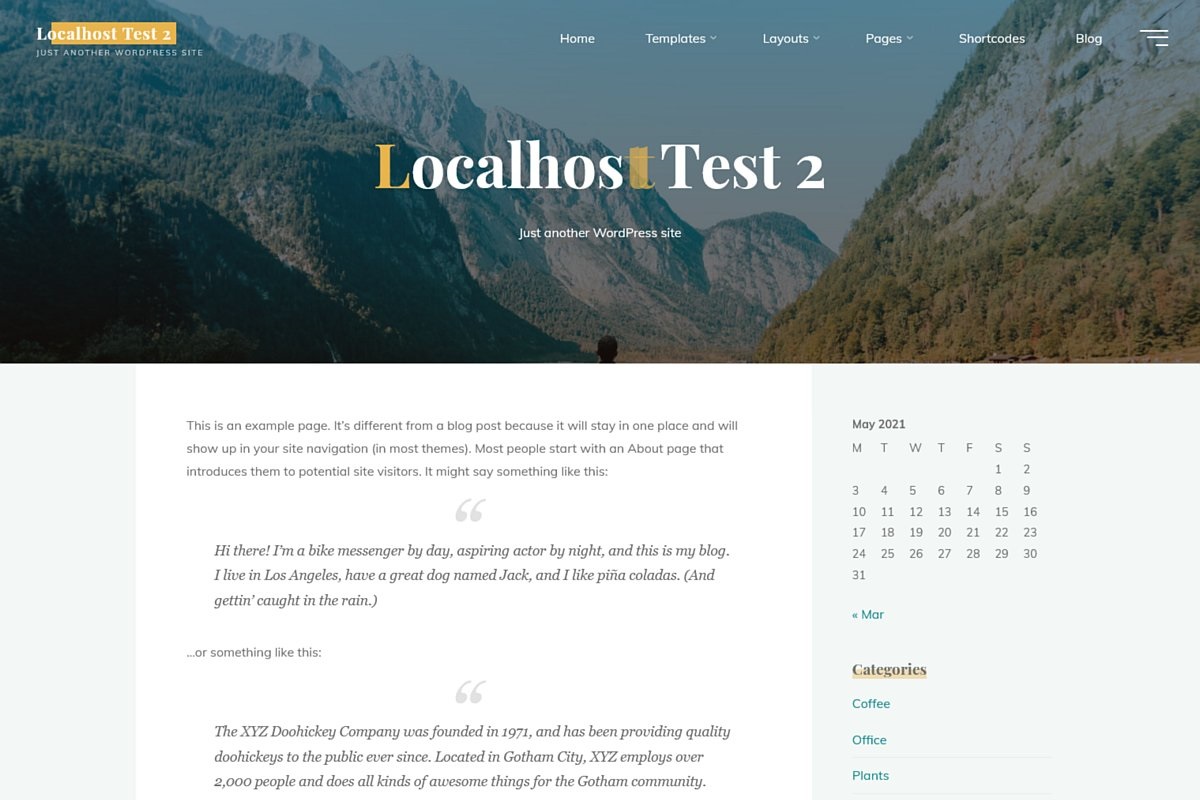
While the landing page is not activated, the theme will use the site title and tagline as the header title area for the homepage, for example with a (static) page:
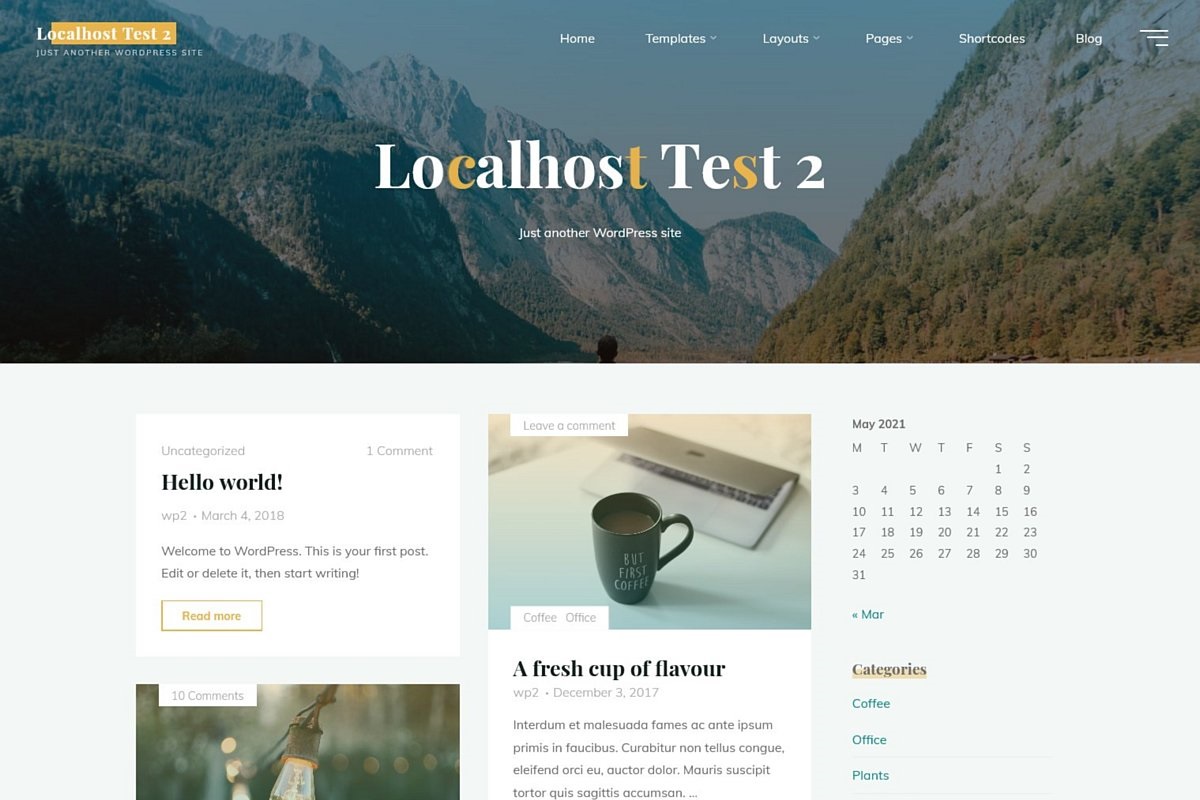
or the default posts list:
 If you like our creations, help us share by rating them on WordPress.org.
Please check the available documentation and search the forums before starting a topic.May 5th, 2021 at 13:05 #117608In reply to: Front page view different from actual post
Cryout Creations mastermindSome of your replies were held for moderation due to the external content/links.
Those screenshots don’t look like any of the default WordPress display modes. Are the 3 individual elements visible in the images separate post or is that just content part of a single post?
Are you using a plugin to build that layout and display that particular look?If you like our creations, help us share by rating them on WordPress.org.
Please check the available documentation and search the forums before starting a topic.May 4th, 2021 at 15:18 #117545In reply to: Front page view different from actual post
Replies to this seems broken?
May 4th, 2021 at 14:07 #117542In reply to: Front page view different from actual post
(second try to reply)
I believe this is a feature of wordpress, the view of all posts when they appear on the front-page and the view of each individual post is different. So, this is what a post look like when I have all posts viewed on the front-page:

This is how it looks like when I view the actual post on it’s own:
 May 4th, 2021 at 11:45 #117537
In reply to: Front page view different from actual post
Hello,
I am not sure this is due to your theme. Seems more to be a feature of wordpress. But here it is. If I view the post as it’s displayed on the main page with “latest posts” it looks like this:
and if I view the post/page directly and not when it’s view from the frontpage:
I have looked around in all places I can seem to think of, but can’t seem to find any setting that controls the view of the posts. Is there a way of controlling this?
Thank you for taking the time to answer!May 3rd, 2021 at 22:10 #117512In reply to: Change the Bravada hamburger menu to text?
Cryout Creations mastermindAre you sure you applied the CSS correctly?
It should at least remove the 3 horizontal lines from the toggler if not also display “A to Z” in some mangled way.If you like our creations, help us share by rating them on WordPress.org.
Please check the available documentation and search the forums before starting a topic.May 3rd, 2021 at 21:55 #117506In reply to: change background colour in scroll-down menu
Cryout Creations mastermindHi,
The background and/or text colors of the menu and menu items can be easily tweaked beyond the available configuration capabilities by applying some custom CSS.
However, the necessary CSS is case dependent and I’d need to browse your site to see what’s less than optimum and needs tweaking.If you like our creations, help us share by rating them on WordPress.org.
Please check the available documentation and search the forums before starting a topic.May 3rd, 2021 at 13:55 #117473In reply to: Change the Bravada hamburger menu to text?
Hi Zed, this has had no affect whatsoever on the hamburger menu. I’m not sure how this will look either but the client wants me to try it. Is there another option to try?
Regards
ChrisMay 2nd, 2021 at 20:40 #117426In reply to: Woocommerce bug
Cryout Creations mastermindHi,
Please change the theme’s comments label option to Labels to improve support for plugins that customize the comment form.
If you like our creations, help us share by rating them on WordPress.org.
Please check the available documentation and search the forums before starting a topic.May 2nd, 2021 at 20:38 #117425In reply to: Read More Button Bug
Cryout Creations mastermindHi,
The load more posts functionality works fine for me at this time, at least with my browser.
Are you still experiencing this issue? What browser/device do you use?
If you like our creations, help us share by rating them on WordPress.org.
Please check the available documentation and search the forums before starting a topic.May 2nd, 2021 at 20:28 #117418In reply to: Remove shadow
Cryout Creations mastermind@sneakerbot: you can apply custom CSS using WordPress’ Additional CSS field.
@ireneausin, if you’re referring to the coloured rectangles visible behind widget titles, those can be removed with the following CSS:body .widget-title { background-image: none; }If you like our creations, help us share by rating them on WordPress.org.
Please check the available documentation and search the forums before starting a topic.May 2nd, 2021 at 20:06 #117413In reply to: Scroll down arrow
Cryout Creations mastermindSorry about the odd replies, spam still manages to creep through.
Try adjusting the scroll indicator arrow to white:
#header-image-main .meta-arrow i {
    color: white;
}
If that is insufficient, perhaps speeding up the animation would help:
body .meta-arrow > i::before {
    -webkit-animation: meta-arrow 1.2s ease-out infinite;
    animation: meta-arrow 1.2s ease-out infinite;
}
If you like our creations, help us share by rating them on WordPress.org.
Please check the available documentation and search the forums before starting a topic.May 2nd, 2021 at 17:58 #117366In reply to: Add white space below header image
Cryout Creations mastermindFor that change the CSS identifier to:
body:not(.home) #content { ...There will still be some space left under the banner/slider for which you’ll need to add an additional bit of styling:
.lp-slider {
    line-height: 0;
}
We’ll sort this part out in the next theme update.
If you like our creations, help us share by rating them on WordPress.org.
Please check the available documentation and search the forums before starting a topic.May 2nd, 2021 at 17:47 #117363In reply to: Gutenberg Image Captions Not Displaying
Power UserSometimes what happens is that the captions in Block Editor images show up as plain text. Instead of the classic editor caption styling being applied, no styling is applied to the caption at all.
May 2nd, 2021 at 17:28 #117351In reply to: Gutenberg Image Captions Not Displaying
Cryout Creations mastermindHi,
Regular captioned images and block images with captions use different markup and as a result they don’t have the same styling applied. This will make them appear differently.
In the topic’s title you mention captions not displaying at all – can you provide a link for where this happens?
If you like our creations, help us share by rating them on WordPress.org.
Please check the available documentation and search the forums before starting a topic.May 1st, 2021 at 18:16 #117306In reply to: Woocommerce bug
website: https://www.bjqjd.com/product/logo-collection/
No stars in the Reviews section-
This reply was modified 5 years ago by
kaka.
May 1st, 2021 at 07:44 #117286In reply to: Woocommerce bug
I am an entrepreneur. During the process of using the Kahuna theme, I found that the reviews in the woocmommerce product have no star rating. This is an error. Please correct it.
April 29th, 2021 at 09:56 #117211In reply to: Remove shadow
irene ausin garcia
Power UserBuenos días,
Me ocurre lo mismo, en el footer, encuentro que mis titulos tienen como una sombra de mitad de texto hacia abajo, como se puede eliminar?
GraciasApril 15th, 2021 at 18:52 #116770In reply to: menu sub-items go beyond visible screen
Julia Johnson
Power UserWe have version 1.0.5 and are experiencing the same thing:
https://bneyyosefna.com, under Mishpacha, Frank Houtz Memorial Scholarship.
How can we fix this?
Website: bneyyosefna.com
April 6th, 2021 at 09:37 #116349In reply to: Scroll down arrow
Hi Zed, thanks for responding, my website is http://www.italieroadtrips.nl
April 5th, 2021 at 23:14 #116339In reply to: Change color of links except in header
Gunnar Madsen
Power UserHi Zed,
I was able to achieve changing the header text color using the following css:
.roseta-over-menu #site-title a,
.roseta-over-menu #access > div > ul > li,
.roseta-over-menu #access > div > ul > li > a,
.roseta-over-menu #sheader.socials a::before {
color: #ffffff;
}It doesn’t appear to have broken anything on the site, but do let me know if this code can be improved upon 🙂 It would be great to have this option built into the theme, I don’t imagine I’m the only person coming up against this issue.
Let’s see if I can post a screenshot here for you… https://www.gunnarspot.com/screenshot/
Website: www.gunnarspot.com/screenshot
April 4th, 2021 at 21:53 #116284In reply to: No Sticky Post in Featured Box
Cryout Creations mastermindHi,
The example code is part of the theme and lists the default parameters of the function call retrieving the featured boxes content. To customize the content you’d need to write your own custom function that filters the necessary parameters (not copy that code as-is).
Sticky posts are already ignored in the retrieval query, as dictated by the
ignore_sticky_posts' => 1parameter. However, this only excludes the sticky posts from being included at the beginning of the list – sticky posts are also regular posts and are included in the results according to their publish date.
To exclude specific posts entirely, you’d need to make use of thepost__not_inparameter by adding it using the filter.If you like our creations, help us share by rating them on WordPress.org.
Please check the available documentation and search the forums before starting a topic.March 29th, 2021 at 14:18 #116071In reply to: Mobile menu
Everything works, cleared cookies
March 29th, 2021 at 06:45 #116060In reply to: No Sticky Post in Featured Box
myob9a
Power UserBy the by – I tried the solution in https://www.cryoutcreations.eu/forums/t/offset-on-featured-posts only to have the functions.php advice of
Uncaught Error: Call to undefined function cryout_localize_cat() in wp-content/themes/kahuna-plus-child/functions.php:34
Stack trace:
#0 wp-settings.php(528): include()
#1 wp-config.php(106): require_once(‘/home/draorg/pu…’)
#2 wp-load.php(37): require_once(‘/home/draorg/pu…’)
#3 wp-admin/admin.php(34): require_once(‘/home/draorg/pu…’)
#4 wp-admin/theme-editor.php(10): require_once(‘/home/draorg/pu…’)
#5 {main}
thrownWebsite: dickson.org.au
March 27th, 2021 at 21:21 #116013Drobb
Power UserThank you Zed! I’ll look into shortcodes. By the way, the other theme (Atahualpa) didn’t use the expressions [current year] and [website name] as such; sorry, I should have said {current year} and {website name}, to indicate that those were variables. So the actual statement I have there currently is
Copyright © 2021 davidweiss.net – All Rights Reserved
Powered by WordPress & AtahualpaI don’t know how Atahualpa updates the year automatically, and I can not longer access the theme’s settings (One of the recent WordPress updates “broke” the theme), to try to figure it out. I suppose I can search through the source files.
But in terms of implementing something similar in Mantra, shortcodes sounds like a good way to do that, since they’re supported in the footer text field. But if there’s a better way, since I don’t necessarily have to use shortcodes, let me know!
-
This reply was modified 5 years ago by
-
AuthorSearch Results



