


Forum Replies Created
-
AuthorPosts
-
Zed
Cryout Creations mastermindIt appears we’ve missed making the one column template responsive.
Try this custom styling:
body .one-column #content { width: 100%; }If you like our creations, help us share by rating them on WordPress.org.
Please check the available documentation and search the forums before starting a topic.Cryout Creations mastermindWhen custom styling is overridden by default or generated theme styling, make your rules more specific. For example, try:
body #content table.pedigree td {However, if !important didn’t work it sounds like you’re using the wrong tag/identifier. Double-check with your browsers development tools or with Firebug.
If you like our creations, help us share by rating them on WordPress.org.
Please check the available documentation and search the forums before starting a topic.Cryout Creations mastermindYou can do so from the theme settings (Appearance > Nirvana Settings > Presentation Page Settings). Look for the Columns sub-section and disable it.
If you like our creations, help us share by rating them on WordPress.org.
Please check the available documentation and search the forums before starting a topic.October 4th, 2015 at 16:00 in reply to: Adding sidebar next to blog posts on presentation page #33823Cryout Creations mastermindNot currently as it requires code changes to be done to the theme, but we are considering adding this as an option in a future update.
If you like our creations, help us share by rating them on WordPress.org.
Please check the available documentation and search the forums before starting a topic.Cryout Creations mastermind1. Content arrangement (in the Editor) is WordPress functionality (and not controlled by the theme). You may get better answers if you ask this in the WordPress forums.
2. You could technically apply a different font (or font set) for each post/page/content section/element on the site, but you’ll need to use custom styling (and perhaps plugins if you intend to use fonts from external sources).
3. As far as I know, WordPress does not have functionality that automatically grab content from other sites by just supplying a link. You can either manually insert the content of the desired story yourself (in a post, page or whatever) or look for a plugin that can do this for you.
If you like our creations, help us share by rating them on WordPress.org.
Please check the available documentation and search the forums before starting a topic.Cryout Creations mastermindLink colours are configurable in theme settings, under Color Settings.
In HTML, link elements do not exist without actually having a link assigned to them. They always link to something (even if that something is an invalid address). So they will always be coloured (as configured in theme settings).
Starting from this, there are several type of links:
- a and a:link – the standard normal link
- a:visited – a link that you’ve already clicked on and visited (at least once before in your browser)
- a:hover – a link you are currently hovering on
- a:active – a link at the instant you are clicking on
While the theme only colours two cases: the hover and all other cases combined, with custom CSS you can control them individually: http://www.w3schools.com/HTML/html_links.asp
To underline all links, this CSS does the trick:
a, a:hover { text-decoration: underline; }If you like our creations, help us share by rating them on WordPress.org.
Please check the available documentation and search the forums before starting a topic.Cryout Creations mastermindWayne, double-check which frontpage areas you’ve configured to hide in theme settings (Presentation Page > Extra > Hide areas).
To hide the header area (above the main menu, where the site title/logo / header image go), set the header height to 0 in theme settings (Header Settings).
If you like our creations, help us share by rating them on WordPress.org.
Please check the available documentation and search the forums before starting a topic.Cryout Creations mastermindAre you using the example child theme? Did you edit its functions.php file or directly Nirvana’s file? (the latter being wrong).
If you like our creations, help us share by rating them on WordPress.org.
Please check the available documentation and search the forums before starting a topic.October 4th, 2015 at 15:42 in reply to: How to move blogs to top in stead of below the columns? #33818Cryout Creations mastermindThe frontpage.php file containes all the sections displayed. To re-order them you’d need to move their responsive blocks of code around.
If you like our creations, help us share by rating them on WordPress.org.
Please check the available documentation and search the forums before starting a topic.Cryout Creations mastermindThe page using the blog template will follow the general layout option set in the theme settings.
If you like our creations, help us share by rating them on WordPress.org.
Please check the available documentation and search the forums before starting a topic.Cryout Creations mastermindListing the issue(s) you are encountering would help a lot in identifying and fixing them (if we can confirm them).
Otherwise, the fixed issues are listed in each update’s announcement post:
http://www.cryoutcreations.eu/nirvana/If you like our creations, help us share by rating them on WordPress.org.
Please check the available documentation and search the forums before starting a topic.Cryout Creations mastermindThe header content left/top margin options should not be used to center the logo.
Use this CSS instead:
#header-container { text-align: center; }If you like our creations, help us share by rating them on WordPress.org.
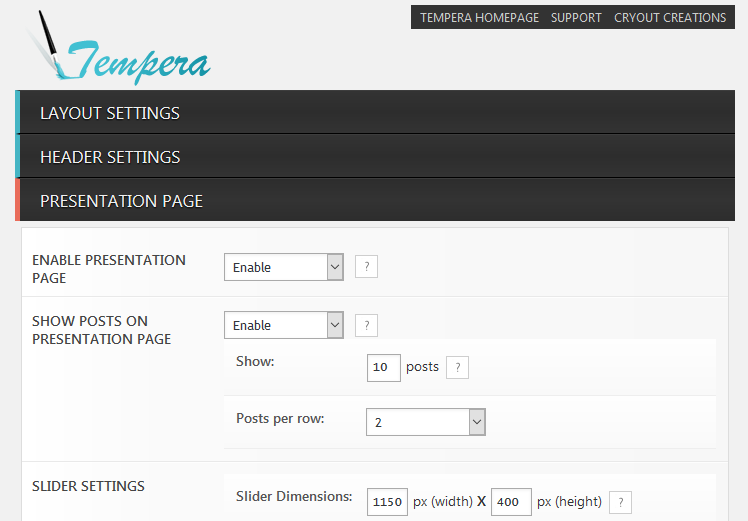
Please check the available documentation and search the forums before starting a topic.Cryout Creations mastermindThe number of posts to be displayed on the homepage when using the presentation page is configurable in the theme’s settings, in the Presentation Page section.
 If you like our creations, help us share by rating them on WordPress.org.
Please check the available documentation and search the forums before starting a topic.Cryout Creations mastermindCould you give a link to a page/post displaying this?
If you like our creations, help us share by rating them on WordPress.org.
Please check the available documentation and search the forums before starting a topic.Cryout Creations mastermindKelly, could you double-check that the widget is correctly placed?
If you like our creations, help us share by rating them on WordPress.org.
Please check the available documentation and search the forums before starting a topic.Cryout Creations mastermindWithout a sample link I could only guess they were using the theme’s columns feature (which is part of the presentation page).
But the texts can be disabled even from posts by filling in empty manual excerpts and changing the featured image size options to make it fill up the width of the post (it is currently only using part of the post width).
If you like our creations, help us share by rating them on WordPress.org.
Please check the available documentation and search the forums before starting a topic.Cryout Creations mastermindCould you provide is with the URL to a page/site exhibiting this issue?
If you like our creations, help us share by rating them on WordPress.org.
Please check the available documentation and search the forums before starting a topic.Cryout Creations mastermindTracia, what browser/device are you seeing this on? Cause it displays fine for me.
If you caching plugin has a CSS minification feature, turn it off.
If you like our creations, help us share by rating them on WordPress.org.
Please check the available documentation and search the forums before starting a topic.October 4th, 2015 at 15:16 in reply to: Scrolling does not work in IE11 unless logged in as Admin #33805Cryout Creations mastermindDisplaying the site via an IFRAME might be the cause of this issue.
You should consider moving the site to the target address and not run it masked from http://www.razzmatazz.se/itautomation/If you like our creations, help us share by rating them on WordPress.org.
Please check the available documentation and search the forums before starting a topic.October 4th, 2015 at 14:46 in reply to: a.continue-reading-link isn't managed by parabola_metaback #33804Cryout Creations mastermindThe continue reading button is indeed not controlled by the meta colour options (as it is not part of the metas), but uses the same colours as the menu items. This is a design choice.
If you like our creations, help us share by rating them on WordPress.org.
Please check the available documentation and search the forums before starting a topic.Cryout Creations mastermindThe two
TypeError: this.transport is null main.js:1207:4
TypeError: jQuery(…).wpColorPicker is not a function
do indicate JavaScript issues.
Whether these are critical and break WordPress’ entire jQuery or just small issues I cannot know from just this log.
If you like our creations, help us share by rating them on WordPress.org.
Please check the available documentation and search the forums before starting a topic.Cryout Creations mastermindAva, are you using the latest 2.4.1(.1) version?
If you like our creations, help us share by rating them on WordPress.org.
Please check the available documentation and search the forums before starting a topic.October 4th, 2015 at 13:29 in reply to: Latest Mantra causes editor to strip all tags on publish #33800Cryout Creations mastermindAre you displaying excerpts or full posts on the front page?
When excerpts are used, all HTML content is automatically stripped by WordPress and the text is trimmed to a limited number of words.Switch to full posts (look in the Post Excerpt in theme settings)
If you like our creations, help us share by rating them on WordPress.org.
Please check the available documentation and search the forums before starting a topic.September 29th, 2015 at 21:40 in reply to: Before Content and After Content Areas do not appear to work #33609Cryout Creations mastermindBetter late than never 😀
The above/below content widget areas will be added to all page templates in the next round of themes updates.
If you like our creations, help us share by rating them on WordPress.org.
Please check the available documentation and search the forums before starting a topic.Cryout Creations mastermindI have only tested Piwik once, but on Parabola, and it appeared to work.
We’ll look into this and see if there’s a problem or not.
If you like our creations, help us share by rating them on WordPress.org.
Please check the available documentation and search the forums before starting a topic.Cryout Creations mastermindDo you want to change the number of posts per page displayed in “Blog”?
That’s the general limit set in WordPress, under Settings > Reading.Also, skip step 2. Doing that will make WordPress force display posts at that address/page ignoring the page template completely (and bypassing several theme settings). Using the blog page template is sufficient to make the page act as WordPress’ standard blog page.
If you like our creations, help us share by rating them on WordPress.org.
Please check the available documentation and search the forums before starting a topic.Cryout Creations mastermindThe theme also has an option to use the images inside posts as featured image if a featured image is not defined. This can be disabled if needed (and is so by default).
The problem with image sizes is more complicated. The image crops of various sizes (based on settings mostly) are generated on file upload. If you then decide to change settings, previously created crops are not recreated, so you’ll end up with non-matching sizes for the places they will be used in. I don’t know when your images/featured images were uploaded (before of after you installed/configured Nirvana), so this may or may not be the issue for you.
Recreating the crop/resized images is possible with additional plugins.If you like our creations, help us share by rating them on WordPress.org.
Please check the available documentation and search the forums before starting a topic.Cryout Creations mastermindWhat browser are you using?
Could you verify with a different browser and see if you can check the right box?
It sounds like a hiccup in the rendering causing the options to partially overlap.If you like our creations, help us share by rating them on WordPress.org.
Please check the available documentation and search the forums before starting a topic.Cryout Creations mastermindAdjust the number of posts per page in Settings > Reading.
If you like our creations, help us share by rating them on WordPress.org.
Please check the available documentation and search the forums before starting a topic.Cryout Creations mastermindJake, check your theme settings. You’ve set a 1150px(!) border on the slider.
If you like our creations, help us share by rating them on WordPress.org.
Please check the available documentation and search the forums before starting a topic. -
AuthorPosts